Why Do CNC Inserts Break? Common Causes and Solutions
Author : Surya makeyoueasy | Published On : 25 Sep 2026
Introduction
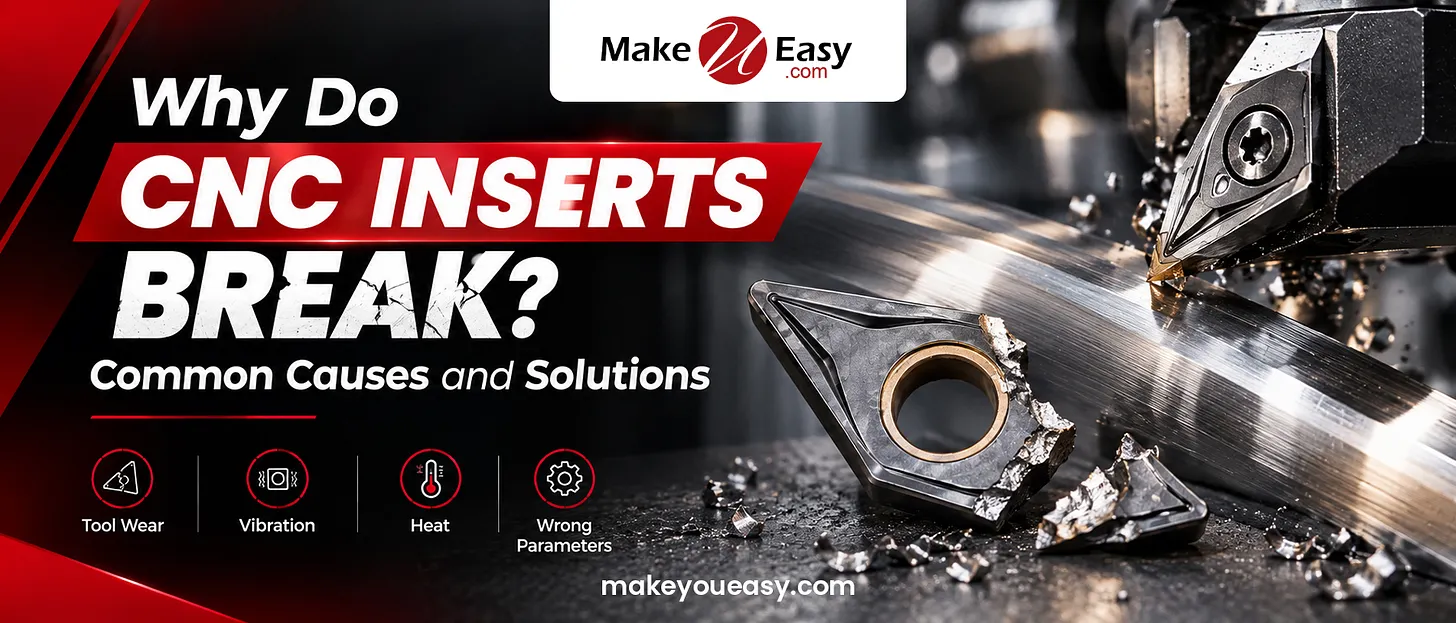
CNC inserts are designed to withstand high cutting forces, temperatures, and continuous machining, but incorrect cutting conditions, vibration, poor tool setup, unsuitable insert geometry, and excessive mechanical or thermal loads can cause premature chipping or breakage. Identifying the failure pattern can help machinists address the root cause rather than repeatedly replacing inserts.
1. Excessive Cutting Force
One of the most common reasons for insert breakage is excessive load on the cutting edge. A feed rate or depth of cut that is too high can overload the insert, especially when the selected geometry or grade is not designed for heavy machining.
Solution:
-
Reduce feed rate or depth of cut.
-
Check the manufacturer’s recommended cutting range.
-
Use a stronger or tougher insert grade for heavy cuts.
-
Consider a thicker or larger insert when the application allows it.
2. Vibration and Poor Rigidity
Chatter and vibration create constantly changing loads on the cutting edge. Excessive tool overhang, weak work holding, flexible components, or poor insert seating can make carbide inserts chip or fracture.
Solution:
-
Keep tool overhang as short as possible.
-
Improve workpiece clamping.
-
Check the toolholder, insert pocket, screw, and shim.
-
Use a more rigid toolholder or boring bar.
-
Ensure the insert is seated correctly and securely.
3. Wrong Insert Grade or Geometry
An insert that is too hard or wear-resistant may not have enough toughness for interrupted or unstable machining. Conversely, an insert selected without sufficient wear resistance may wear rapidly under demanding conditions.
Insert geometry also matters. Stronger cutting edges are generally better suited to heavy or interrupted cuts, while sharper geometries can be useful where lower cutting forces and finishing performance are required.
Solution:
-
Match the insert grade to the workpiece material.
-
Choose stronger geometry for heavy or interrupted cutting.
-
Use tougher grades when shock loading or vibration is present.
-
Select the appropriate chip breaker for the feed and depth of cut.
4. Incorrect Cutting Speed and Feed
Incorrect cutting parameters can cause either excessive heat and wear or unstable cutting. Extremely low cutting conditions can also contribute to rubbing and built-up edges, while excessive speed, feed, or depth of cut can overload the cutting edge.
Solution:
-
Start with the insert manufacturer’s recommended parameters.
-
Adjust cutting speed according to the workpiece material and insert grade.
-
Maintain an appropriate feed for the selected chip breaker.
-
Avoid making large parameter changes without checking the resulting wear pattern.
5. Poor Chip Evacuation
Chips that remain around the cutting zone can strike the insert again, interfere with the workpiece, or become trapped between the tool and material. This can lead to chip hammering and edge damage.
Solution:
-
Check whether the chip breaker is producing manageable chips.
-
Adjust feed or cutting speed when appropriate.
-
Improve coolant direction and chip evacuation.
-
Select a chip breaker designed for the machining operation.
6. Thermal Cracking
Thermal cracking occurs when the cutting edge experiences repeated temperature changes. This can happen particularly during milling and interrupted cutting when coolant reaches the hot cutting edge intermittently.
Thermal cracks often appear roughly perpendicular to the cutting edge and can eventually cause pieces of carbide to break away.
Solution:
-
Use coolant consistently when the application requires it.
-
Avoid intermittent coolant flow onto a very hot cutting edge.
-
Consider a tougher grade for interrupted machining.
-
Reduce cutting speed and feed if excessive thermal loading is present.
7. Built-Up Edge
A built-up edge occurs when workpiece material adheres to the cutting edge. When the attached material breaks away, it can pull small pieces from the insert or damage the cutting edge.
This problem is more common with materials that tend to adhere to the cutting tool under unsuitable cutting conditions.
Solution:
-
Check whether cutting speed is appropriate.
-
Use a sharper or suitable insert geometry.
-
Select a suitable coated grade.
-
Improve coolant application where appropriate.
8. Worn Insert Used Too Long
An insert does not always break because of an immediate machining problem. Excessive wear can weaken the cutting edge until the remaining carbide cannot withstand the cutting load.
Solution:
-
Monitor flank wear and other wear patterns.
-
Index or replace the insert before severe wear develops.
-
Do not continue machining simply because the insert is still producing an acceptable surface.
-
Investigate abnormal wear before it develops into catastrophic failure.
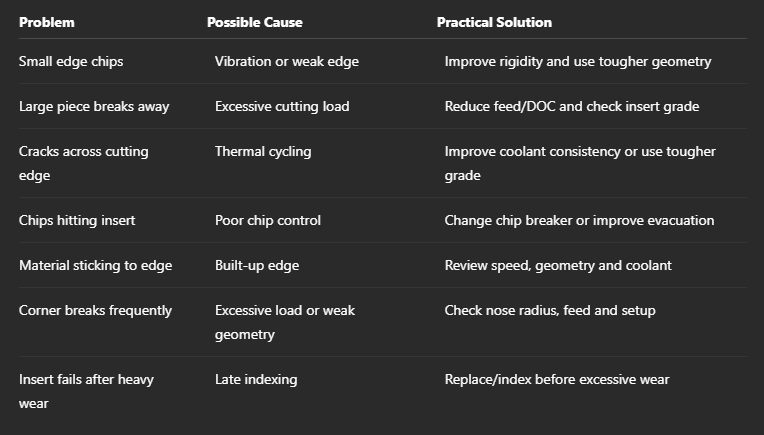
CNC Insert Breakage: Quick Troubleshooting Guide
How to Prevent CNC Insert Breakage
A systematic approach can reduce repeated insert failures:
-
Check the setup first: Verify work holding, tool clamping, insert seating, and overhang.
-
Inspect the broken insert: Look for chipping, cracking, excessive wear, or material adhesion.
-
Review cutting parameters: Compare speed, feed, and depth of cut with the insert manufacturer’s recommendations.
-
Check chip control: Make sure chips are leaving the cutting zone without recutting.
-
Match the grade and geometry: Select the insert according to material, cutting operation, and stability.
-
Change one variable at a time: This makes it easier to identify the actual cause of failure.
Why Choose MakeYouEasy?
MakeYouEasy provides CNC tooling options for turning, milling, drilling, and other machining applications. Choosing the correct insert is only one part of achieving reliable tool life. Proper grade selection, compatible geometry, suitable cutting parameters, and a rigid machining setup all work together to prevent premature insert failure.
Conclusion
CNC insert breakage is usually a sign that something in the machining system needs attention. Excessive cutting forces, vibration, incorrect parameters, poor chip evacuation, thermal cycling, built-up edge, unsuitable insert geometry, and excessive wear can all contribute to failure. Instead of immediately changing to another insert, inspect the damage pattern and check the setup, cutting conditions, and insert selection. A systematic troubleshooting approach can improve tool life, machining consistency, and overall productivity.
Frequently Asked Questions
1. Why do CNC inserts break suddenly?
Sudden breakage is commonly associated with excessive cutting load, vibration, interrupted cutting, poor support, or an unsuitable insert grade.
2. Can a high feed rate break an insert?
Yes, excessive feed can increase cutting forces beyond the insert’s recommended load, causing chipping or fracture.
3. Does tool overhang affect insert life?
Yes, excessive overhang can increase deflection and vibration, which can accelerate insert chipping and breakage.
4. Can coolant cause CNC inserts to crack?
Intermittent coolant during high-temperature or interrupted cutting can contribute to thermal cracking.
5. How can I prevent CNC insert breakage?
Use the correct insert grade and geometry, maintain a rigid setup, follow recommended cutting parameters, control chips, and replace inserts before excessive wear develops.
Popular Search Keywords
CNC insert breakage causes, why CNC inserts break, CNC insert failure, carbide insert chipping, CNC turning insert problems, milling insert breakage, carbide insert troubleshooting, CNC cutting tool failure, insert chipping causes, CNC machining insert life
