Why CNC Cutting Tools Overheat During Machining
Author : Surya makeyoueasy | Published On : 28 Sep 2026
Introduction
CNC cutting tools generate heat whenever material is removed from a workpiece, but excessive heat can accelerate tool wear, damage cutting edges, reduce dimensional accuracy, and shorten tool life. High cutting speed, incorrect feed, excessive cutting depth, insufficient coolant, poor chip evacuation, tool deflection, and unsuitable tool geometry are common causes. Understanding where the heat comes from makes it easier to correct the machining process instead of simply replacing the tool.
1. Cutting Speed Is Too High
Cutting speed has a major influence on cutting temperature. Increasing speed can increase the temperature at the cutting edge and accelerate wear.
When a tool becomes excessively hot during machining, the first parameter to review is the recommended cutting speed for the selected tool, grade, and workpiece material. Sandvik Coromant identifies excessive cutting speed as a cause of excessive flank wear and high cutting temperature.
Solution:
-
Reduce cutting speed gradually.
-
Check the tool manufacturer’s recommended cutting range.
-
Match cutting speed to the workpiece material and tool grade.
-
Inspect the tool for heat-related wear after adjustment.
2. Feed Rate Is Incorrect
Feed affects chip thickness and cutting forces. A feed that is too low can cause the cutting edge to rub instead of efficiently shearing the material, generating unnecessary heat.
On the other hand, excessive feed can overload the cutting edge and increase mechanical stress.
Solution:
-
Follow the recommended feed per tooth or feed per revolution.
-
Avoid extremely light feeds that cause rubbing.
-
Avoid excessive feed that overloads the cutting edge.
-
Match feed to the tool geometry and depth of cut.
The correct feed is therefore a balance between efficient cutting and acceptable cutting load.
3. Cutting Depth and Radial Engagement Are Too High
Large axial depth of cut (ap) or radial engagement (ae) increases the amount of material being removed and can significantly increase cutting forces and power requirements.
For milling, cutting engagement should be considered together with depth of cut, cutter geometry, material, and machine capability. Higher engagement can require adjustments to depth of cut and cutting parameters.
Solution:
-
Reduce axial or radial engagement when necessary.
-
Use a suitable milling strategy for high material-removal operations.
-
Check spindle power and torque.
-
Use manufacturer-recommended cutting conditions.
4. Poor or Incorrect Coolant Application
Coolant helps control heat, lubricate the cutting zone in suitable applications, and assist with chip evacuation. However, simply turning coolant on does not guarantee effective cooling.
Coolant needs to reach the cutting zone correctly. Poor direction, insufficient flow, or inconsistent delivery can leave the cutting edge exposed to excessive temperature.
Solution:
-
Aim the coolant directly at the cutting zone.
-
Check coolant flow and pressure.
-
Keep nozzles correctly positioned.
-
Use through-tool coolant where the tool and application support it.
-
Maintain clean coolant and filtration systems.
Important: Coolant strategy depends on the tool and material. Some milling applications can be run dry, while others benefit from controlled coolant. In certain cases, intermittent coolant can contribute to thermal cracking.
5. Poor Chip Evacuation
Chips carry heat away from the cutting zone. When chips remain in the cut, they can be recut and transfer heat back into the tool and workpiece.
Poor chip evacuation is particularly problematic in deep holes, pockets, grooves, and other restricted areas.
Solution:
-
Improve coolant direction.
-
Use a suitable flute or chipbreaker geometry.
-
Check the chip shape and size.
-
Use through-tool coolant when appropriate.
-
Adjust cutting conditions if chips are too long or difficult to evacuate.
Good chip evacuation can help reduce heat accumulation and prevent chip recutting.
6. Tool Geometry Is Not Suitable
Tool geometry influences cutting forces, chip formation, and heat generation. A geometry designed for heavy roughing may behave differently from a sharp finishing geometry.
Using an unsuitable geometry can cause excessive rubbing, cutting forces, or poor chip control.
Solution:
-
Select geometry according to the machining operation.
-
Use sharper geometry where lower cutting forces are required.
-
Use stronger edge preparation for heavy cutting.
-
Match the chipbreaker to the feed and depth of cut.
Sandvik describes tool geometry as a major factor controlling chip formation, chip control, and cutting forces.
7. Tool Is Rubbing Instead of Cutting
A cutting tool can generate excessive heat when it is not removing material efficiently.
Common causes include:
-
Feed rate that is too low
-
Incorrect relief angle
-
Excessive tool runout
-
Worn cutting edge
-
Incorrect toolpath
-
Insufficient engagement
When the tool rubs against the workpiece, friction increases without producing efficient chip removal.
Solution:
-
Check feed rate.
-
Inspect cutting-edge condition.
-
Verify tool runout.
-
Check tool geometry.
-
Review the toolpath and cutting engagement.
8. Tool Overhang Is Excessive
A long tool assembly can deflect and vibrate during machining. Vibration changes the cutting load and can increase friction, heat, edge chipping, and premature wear.
Solution:
-
Keep tool overhang as short as practical.
-
Use a rigid toolholder.
-
Improve workpiece clamping.
-
Reduce cutting load when necessary.
-
Consider a larger or more rigid tool where the geometry permits.
Machine and tool stability are particularly important when machining difficult materials. Sandvik also highlights tool overhang and machine stability as factors affecting tool life and machining quality.
9. The Tool Is Worn, or the Wrong Grade Is Being Used
A worn cutting edge can generate more heat because the tool no longer cuts with its original geometry.
An unsuitable grade can also wear too quickly under the actual machining conditions.
Signs may include:
-
Increasing cutting temperature
-
Flank wear
-
Crater wear
-
Edge deformation
-
Poor surface finish
-
Increasing spindle load
Sandvik identifies high cutting temperature, excessive speed, insufficient wear resistance, and inadequate coolant as contributors to several common wear patterns.
Solution:
-
Inspect the cutting edge regularly.
-
Replace or index worn inserts.
-
Select a grade suited to the workpiece material.
-
Review cutting speed, feed, and coolant together.
CNC Tool Overheating: Quick Troubleshooting Guide
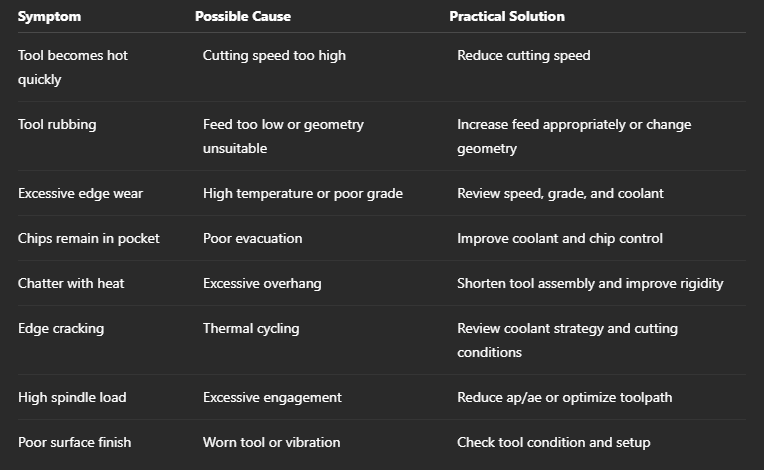
How to Prevent CNC Cutting Tool Overheating
A simple troubleshooting sequence can help:
-
Check cutting speed against the manufacturer’s recommendation.
-
Verify feed and make sure the tool is cutting rather than rubbing.
-
Check AP and AE for milling operations.
-
Inspect coolant delivery at the actual cutting zone.
-
Check chip evacuation and chip shape.
-
Inspect tool geometry and wear.
-
Reduce tool overhang and improve machine rigidity.
-
Change only one major parameter at a time so the effect can be identified.
Why Choose MakeYouEasy?
At MakeYouEasy, you can explore CNC cutting tools, milling cutters, drills, inserts, holders, and other machining products for different applications.
Choosing the correct tool is only the beginning. Matching the tool geometry, grade, cutting speed, feed, depth of cut, coolant strategy, and machine setup is essential for controlling heat and achieving consistent machining performance.
Conclusion
CNC cutting tools naturally generate heat during machining, but excessive temperature is usually a sign that the cutting process needs attention. High cutting speed, incorrect feed, excessive engagement, poor coolant delivery, chip recutting, unsuitable geometry, tool rubbing, excessive overhang, and worn cutting edges can all contribute to overheating.
Instead of immediately replacing a hot tool, inspect the cutting conditions and tool condition systematically. By balancing cutting speed, feed, engagement, tool geometry, coolant, chip evacuation, and machine rigidity, machinists can reduce unnecessary heat and improve tool life, surface finish, and machining consistency.
Frequently Asked Questions
1. Why does my CNC cutting tool get hot?
Excessive cutting speed, incorrect feed, high cutting engagement, poor coolant delivery, tool rubbing, and worn cutting edges are common causes.
2. Does higher cutting speed increase tool temperature?
Yes, increasing cutting speed generally increases cutting temperature and can accelerate tool wear if the recommended range is exceeded.
3. Can low feed cause cutting tool overheating?
Yes, an excessively low feed can cause the tool to rub instead of efficiently shearing the material, increasing friction and heat.
4. Does coolant always prevent tool overheating?
No, coolant must reach the cutting zone effectively, and some applications require dry machining or a specific coolant strategy.
5. How can I reduce CNC cutting tool temperature?
Check cutting speed and feed, optimize cutting engagement, improve coolant and chip evacuation, use suitable tool geometry, and maintain a rigid setup.
Popular Search Keywords
CNC cutting tool overheating, why CNC tools overheat, CNC machining heat problems, cutting tool temperature, CNC tool heat causes, CNC milling overheating, CNC turning tool overheating, and cutting tool cooling. CNC tool wear causes, how to reduce cutting tool heat
