USB RFID Reader Integration with Inventory, ERP, and Business Software
Author : Jaming Wong | Published On : 19 Oct 2026
USB RFID reader can identify tagged products, tools, equipment, and other assets. However, reading a tag is only one part of a complete business solution. The tag data must also reach the correct software system, match the right record, and trigger the appropriate business action.
For example, when a warehouse employee scans a tagged item, the inventory system may need to identify the product, update its location, and record who handled it. In a manufacturing environment, the same RFID event may need to update a work order or confirm that a component has reached a particular production stage.
This is where USB RFID reader integration becomes important. Choosing a reader with the right interface, software support, and data-handling capabilities can make the difference between a quick demonstration and a reliable business deployment.
What Is USB RFID Reader Integration?
USB RFID reader integration connects RFID hardware to an application that uses the information collected from RFID tags.
The reader communicates with a compatible tag and receives the available data. A host computer or connected application then processes that information and passes it to the relevant business system.
Depending on the project, the application may be a desktop inventory tool, warehouse management system (WMS), enterprise resource planning (ERP) platform, manufacturing execution system (MES), or custom software.
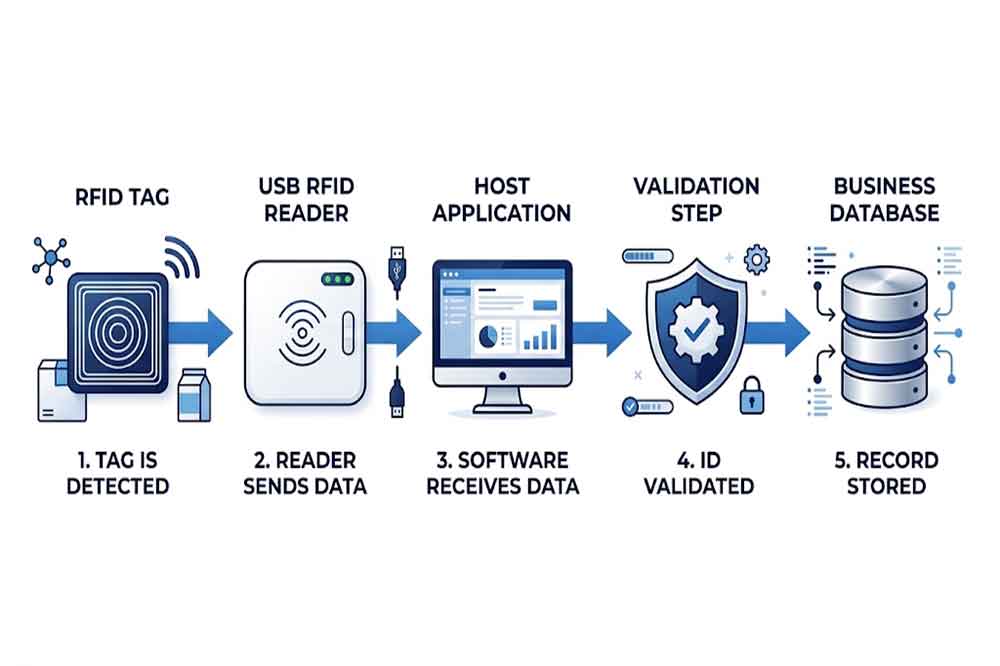
A simple workflow may look like this:
- An operator presents an RFID-tagged item to the reader.
- The reader receives the tag’s identifier or other supported data.
- The host application captures the result.
- The application validates the data and finds the related business record.
- The application updates the database or triggers the next workflow step.
- The system displays the result or alerts the operator if an error occurs.
The reader does not automatically perform every step. In many projects, the business application controls the database lookup, validation rules, permissions, and transaction logic.
Understanding this separation helps buyers identify which functions belong to the reader and which must be implemented in software.
Common Business Systems That Use USB RFID Readers
Inventory management software
Inventory applications use RFID identifiers to look up products, record stock movements, and associate items with storage locations.
For example, a staff member may scan a tagged tool before moving it to another department. The application reads the identifier, retrieves the tool record, and asks the operator to confirm the destination.
In this workflow, the RFID reader supplies identification data. The application remains responsible for updating the correct record and recording the transaction.
ERP systems
An ERP platform may connect purchasing, inventory, production, sales, and financial processes. RFID data can support item identification within these workflows.
A USB RFID reader may operate at a workstation where employees receive goods, issue materials, or verify products before dispatch. The integration could pass the tag identifier to a local application, which then communicates with the ERP system through an approved interface.
The exact integration method depends on the ERP platform, available APIs, network architecture, and the organization’s software policies.
Warehouse management systems
A WMS manages warehouse locations, stock movements, picking, receiving, and shipping. A USB RFID reader can support workstation-based tasks where employees need to identify tagged products or containers.
The application may validate whether an item belongs to a shipment, confirm its assigned location, or flag an unexpected identifier.
A desktop reader is not a replacement for every fixed or handheld RFID solution. It is most useful when the workflow is based around a computer workstation, controlled scanning position, or individual item verification.
Manufacturing and production software
In manufacturing, a USB RFID reader may be installed at a workstation to identify a component, product, tool, or work-in-progress item.
The software may use the identifier to retrieve a work order, record a production step, or check whether the correct item is being processed.
Where the process requires writing data to the tag, the reader must support the relevant tag protocol and write commands. The application also needs to manage data validation and verify the result when the hardware supports read-back checking.
Choosing the Right Communication Interface
One of the first integration decisions is how the reader will communicate with the application.
USB keyboard emulation
Some RFID readers send tag data to the computer as keyboard input. The identifier appears in the active text field, much like information typed by a keyboard.
This method can be convenient for simple applications that accept a tag value in a form. It may require little custom development.
However, keyboard emulation offers limited control compared with a dedicated software interface. The application may not receive detailed device status, structured error codes, or advanced tag operation results. Focus management and data formatting also need to be considered.
Serial or virtual COM communication
Some readers expose a serial-style interface through USB. An application sends commands and receives responses through that interface.
This approach can provide more direct control, depending on the device’s command protocol. It may be suitable for projects that require configuration, repeated reading, or other supported operations.
Before selecting this option, confirm the communication protocol, supported operating systems, command documentation, and available sample code.
SDK and API integration
A software development kit (SDK) or application programming interface (API) can help developers integrate reader functions into a custom application.
Depending on the model, available functions may include reading tag identifiers, configuring reader parameters, accessing supported memory, or performing specific tag operations.
SDKs and APIs are not universal. Their functions, programming languages, dependencies, and supported operating systems vary by supplier and model.
For a custom project, request the relevant documentation and test code early in the development process.
Understanding the Data Flow
A reliable integration requires more than moving a tag value from the reader to a database.
Consider an asset checkout system. An employee scans a tagged device, and the application receives its identifier. The application must then confirm that the identifier exists, check whether the employee has permission to borrow the device, update its status, and record the transaction.
If the system simply accepts every scanned value, incorrect or duplicate transactions may occur.
A better workflow separates several tasks:
Data capture: Receive the tag value from the reader and identify the source of the event.
Validation: Check the data format and confirm that the identifier is valid for the application.
Record matching: Find the corresponding product, asset, or work order in the business database.
Business rules: Apply permissions, location rules, inventory checks, or other required conditions.
Database update: Save the transaction through the application’s approved data interface.
User feedback: Show success, failure, or the next required action.
This structure makes it easier to diagnose problems. If a tag is read correctly but the wrong record appears, the cause may be in the database mapping rather than the RFID hardware.
