RFID Tool Cabinet Maintenance and Troubleshooting Guide
Author : Jaming Wong | Published On : 28 Sep 2026
RFID tool cabinet is designed to automate tool storage, tracking, checkout, return, and inventory. But like any industrial system, its performance can change over time because of tag damage, tool movement, hardware conditions, software configuration, network issues, or changes in the working environment.
Regular maintenance helps keep RFID reading performance and tool records consistent. When a problem occurs, a structured troubleshooting process can also prevent unnecessary hardware replacement.
For example, a tool may appear to be missing from the software even though it is physically inside the cabinet. The problem may not be the software itself. The RFID tag could have moved, become damaged, or entered a weak reading position.
That is why maintenance should examine the complete system rather than focusing on one component immediately.
A simple schedule can include:
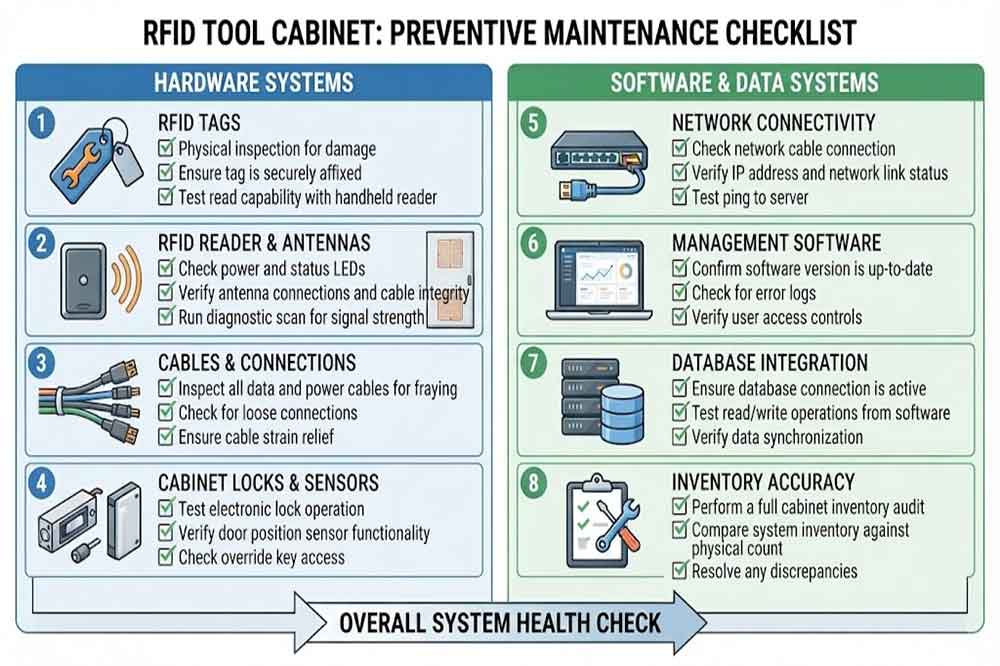
Common problems include:
Check whether the RFID tag is still firmly attached and whether its position has changed.
For metal tools, confirm that the selected tag is suitable for metal surfaces.
A replacement tag should also be registered in the software before the tool returns to normal operation.
Start with a simple question:
Does the system fail to read one specific tool, or does it fail to read many tools?
If only one tool is affected, inspect its tag and mounting position.
If many tools are affected, investigate:
A useful troubleshooting method is to test the same tool at different positions inside the cabinet.
The cabinet may detect a tool that should not be included in the transaction.
Possible causes include:
For a tool cabinet, controlled reading is generally more useful than simply maximizing reading distance.
Regular maintenance helps keep RFID reading performance and tool records consistent. When a problem occurs, a structured troubleshooting process can also prevent unnecessary hardware replacement.
1. Why RFID Tool Cabinet Maintenance Matters
A smart tool cabinet combines several components:- RFID tags
- RFID readers
- RFID antennas
- Cabinet structure
- User authentication
- Electronic locks
- Sensors
- Network equipment
- Management software
- Tool database
For example, a tool may appear to be missing from the software even though it is physically inside the cabinet. The problem may not be the software itself. The RFID tag could have moved, become damaged, or entered a weak reading position.
That is why maintenance should examine the complete system rather than focusing on one component immediately.
2. Create a Regular Maintenance Schedule
The maintenance frequency depends on the operating environment and usage level.A simple schedule can include:
Daily checks
Operators can check whether:- The cabinet starts normally
- The display works
- Users can authenticate
- The door or drawer operates correctly
- Tools are being recorded normally
Weekly checks
Technical staff can review:- RFID reading events
- Missing-tool alerts
- Failed transactions
- Network status
- Unusual access records
Monthly checks
A more detailed inspection can include:- RFID tag condition
- Reader connections
- Antenna connections
- Cabinet sensors
- Door mechanisms
- Software records
- Backup status
3. Check RFID Tags First
RFID tags are attached directly to tools, so they are exposed to daily handling.Common problems include:
- Damaged tags
- Loose tags
- Incorrect tag position
- Contaminated tag surfaces
- Replaced tools with old tags
- Unregistered replacement tags
Check whether the RFID tag is still firmly attached and whether its position has changed.
For metal tools, confirm that the selected tag is suitable for metal surfaces.
A replacement tag should also be registered in the software before the tool returns to normal operation.
4. Troubleshoot RFID Reading Problems
One of the most common issues is inconsistent RFID detection.Start with a simple question:
Does the system fail to read one specific tool, or does it fail to read many tools?
If only one tool is affected, inspect its tag and mounting position.
If many tools are affected, investigate:
- RFID reader status
- Antenna connection
- Reader configuration
- Power supply
- Network communication
- Cabinet structure
- Environmental changes
5. When Tools Are Not Detected
A tool that is physically inside the cabinet but absent from the software may have several possible causes.Check the RFID tag
Confirm that the tag is registered and functioning.Check the tag position
A small change in tag orientation can sometimes affect RFID performance.Check the antenna area
The tool may be positioned outside the effective reading zone.Check the reader
Confirm that the reader is powered and communicating correctly.Check software records
The RFID tag ID may be associated with the wrong tool record.Check recent cabinet changes
New shelves, metal partitions, tools, or equipment can change the RFID environment.A useful troubleshooting method is to test the same tool at different positions inside the cabinet.
6. When the System Detects Unwanted Tools
The opposite problem can also occur.The cabinet may detect a tool that should not be included in the transaction.
Possible causes include:
- RFID reading range is too broad
- Antenna positioning needs adjustment
- Nearby tagged tools are too close
- Cabinet doors are open during the transaction
- Reader settings are not optimized
- External RFID sources are nearby
For a tool cabinet, controlled reading is generally more useful than simply maximizing reading distance.
