RFID Tool Cabinet for Tool Lifecycle Management: Managing Tools From Registration to Retirement
Author : Jaming Wong | Published On : 09 Oct 2026
What Is Tool Lifecycle Management?
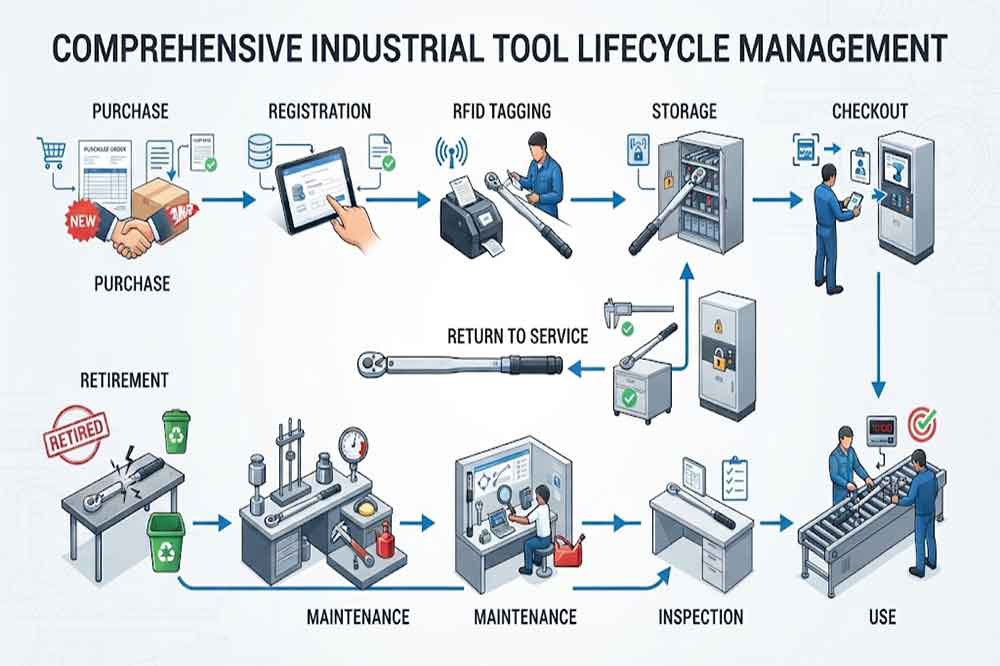
Tool lifecycle management means managing a tool through the different stages of its working life.
A typical lifecycle may look like:
Purchase → Registration → RFID Tagging → Storage → Issue → Use → Inspection → Maintenance → Calibration → Return to Service → Retirement
Not every tool will pass through every stage.
For example, a simple hand tool may require only registration, issue, return, inspection, and retirement.
A precision measuring instrument may require much more information, including calibration certificates, inspection results, service history, and restricted-use rules.
The lifecycle should therefore be designed around the actual tool category.
Stage 1: Tool Registration
The lifecycle starts when the tool enters the organization.
The digital record may include:
- Tool ID
- Tool name
- Manufacturer information
- Model
- Specification
- Purchase date
- Supplier
- Department
- Tool category
- Ownership
- RFID tag ID
- Calibration requirement
- Maintenance requirement
The RFID tag connects the physical tool to this record.
This is important because two tools can look almost identical while having completely different service histories.
A unique tool ID helps prevent these records from being mixed.
Stage 2: RFID Tagging and Identification
The RFID tag should be selected according to the tool’s physical characteristics.
Metal surfaces, curved surfaces, small tools, high-temperature environments, chemicals, and frequent handling can all affect tag selection.
A tag that works well on one tool may not perform the same way on another.
For this reason, organizations should test representative tools before applying tags to the entire tool population.
The objective is not simply to attach an RFID label.
The objective is to create a stable relationship between:
Physical Tool ↔ RFID Identity ↔ Digital Tool Record
Stage 3: Storage and Availability
After registration, tools may be placed inside an RFID smart tool cabinet or another controlled storage location.
The system can associate the tool with:
- Cabinet
- Shelf or position
- Department
- Location
- Availability
- Current status
This gives employees a more useful view than simply seeing a physical storage cabinet.
For example, a tool may exist in the inventory database but still be unavailable because it is undergoing calibration.
The system should distinguish between inventory existence and actual availability.
See our guide to RFID Tool Cabinet Tool Reservation and Availability Management for more information.
Stage 4: Tool Issuing and Daily Use
Once a technician needs the tool, the normal workflow may include user authentication, tool identification, checkout, and work assignment.
The RFID cabinet can record the transaction and update the tool’s status.
A simplified lifecycle event might look like:
Available → Checked Out → In Use
The tool can remain associated with the responsible user until it is returned or transferred according to the organization’s workflow.
This information becomes especially useful when tools are shared between multiple employees or departments.
For the issuing process, see RFID Tool Issuing and Return Management.
Stage 5: Inspection After Use
A tool may look physically normal while still requiring inspection.
Depending on the tool type, inspection can check:
- Physical damage
- Wear
- Missing components
- Cleanliness
- Function
- Calibration status
- Safety condition
After return, the system may allow a supervisor or technician to change the tool status.
For example:
Returned → Inspection Required → Available
or:
Returned → Damaged → Maintenance Required
This separates tool return from tool readiness.
That distinction is important in industrial environments.
Stage 6: Maintenance and Repair
Tools eventually require maintenance.
A tool may be removed from normal circulation and assigned a maintenance status.
Possible states include:
- Maintenance Required
- Under Repair
- Waiting for Parts
- Inspection Required
- Ready for Service
- Retired
The RFID cabinet provides the tool identity, while management software can store the maintenance information.
This allows maintenance records to stay connected with the physical tool.
See RFID Tool Cabinet Maintenance and Troubleshooting for related maintenance workflows.
Stage 7: Calibration Management
Precision tools may require periodic calibration.
A tool’s lifecycle record can include:
- Last calibration date
- Next calibration date
- Calibration result
- Certificate number
- Calibration provider
- Calibration status
When the calibration period expires, the tool can be changed to a restricted or unavailable status.
This can help prevent an overdue tool from being treated as normally available.
RFID does not replace the calibration process. It helps connect the physical tool with the relevant digital status.
See RFID Tool Cabinet for Tool Calibration for the dedicated calibration workflow.
Stage 8: Return to Service
After maintenance, inspection, or calibration, the tool should not automatically become available.
A controlled workflow may require:
Service Complete → Inspection → Approval → Available
The exact approval process depends on the tool and organization.
For critical equipment, a supervisor or quality team may need to confirm that the tool can return to production.
This creates a clear boundary between a tool that has been serviced and a tool that has actually been approved for use.
Stage 9: Tool Retirement
Eventually, every tool reaches the end of its useful life.
Reasons can include:
- Excessive wear
- Physical damage
- Obsolete specification
- Failed inspection
- Repeated repair
- High maintenance cost
- Replacement by a newer model
- Production process changes
The tool should be marked as retired rather than simply deleted from the database.
A retired record may still contain useful historical information.
For example, management may later need to know:
- When the tool was purchased
- How long it was used
- How often it required repair
- How many calibration cycles it completed
- Why it was retired
This information can support future purchasing and asset decisions.
Tool Lifecycle Status Management
A practical RFID tool management system should define clear statuses.
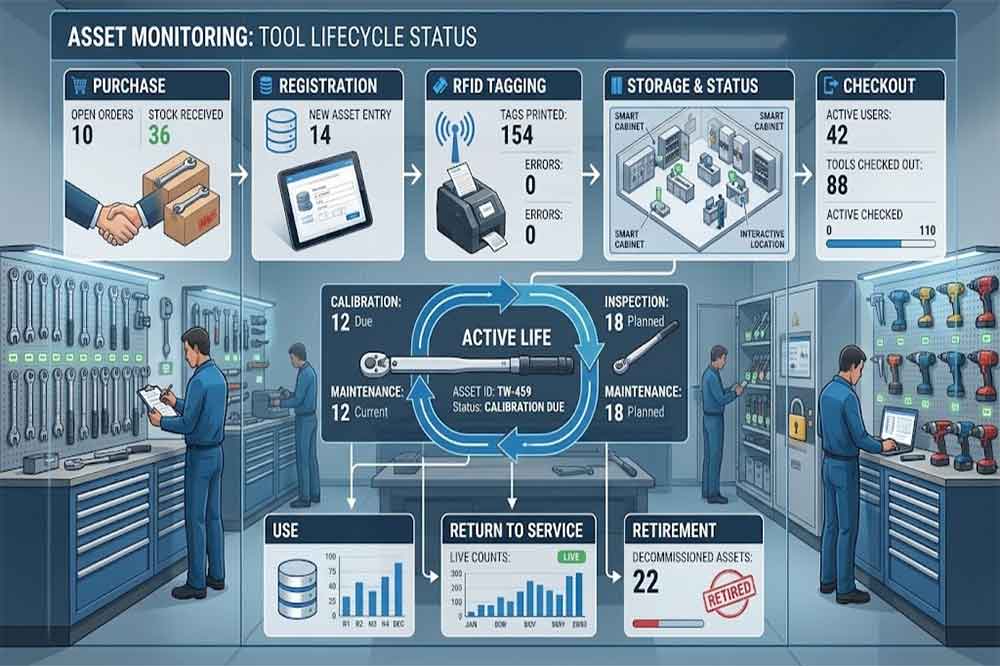
A possible structure is:
| Lifecycle Stage | Example Status |
|---|---|
| New | New / Unregistered |
| Registered | Active Inventory |
| Available | Ready for Use |
| Issued | Checked Out |
| In Use | Assigned |
| Returned | Return Pending |
| Inspection | Inspection Required |
| Maintenance | Under Maintenance |
| Calibration | Calibration Required |
| Restricted | Not Available |
| Approved | Ready for Service |
| Retired | Retired |
The exact names should be adapted to the organization’s workflow.
Too many statuses can make the system difficult for employees to understand.
Too few statuses can hide important differences between available, damaged, calibrated, and restricted tools.
Connecting Lifecycle Data With Software
An RFID cabinet is most useful when it works with the wider management system.
Depending on the organization, lifecycle information may connect with:
- ERP
- MES
- WMS
- CMMS
- Asset management software
- Calibration software
- Quality systems
- Custom applications
For example:
RFID Cabinet → Tool Event → Software → Tool Status → User / Work Order / Maintenance Record
This can turn a cabinet transaction into a useful business event.
See RFID Tool Cabinet Software Integration for more information about APIs, data mapping, and system integration.
Lifecycle Management Across Multiple Locations
Tools can move between departments during their working life.
A tool may start in:
Central Tool Room
then move to:
Maintenance Department → Production Line → Inspection Area → Tool Room
When multiple RFID cabinets share the same tool database, these location changes can remain connected to the same tool identity.
This becomes especially useful when an organization operates multiple production areas or facilities.
See RFID Tool Cabinet for Multi-Location Tool Management for more information.
Why Lifecycle Management Is Different From Inventory Management
Inventory management mainly asks:
“What tools do we have?”
Lifecycle management asks:
“What stage is each tool in, and what should happen next?”
For example, two identical torque tools may both exist in inventory.
But:
- Tool A is available.
- Tool B is overdue for calibration.
Inventory counting alone may treat both as available assets.
Lifecycle management distinguishes their operational status.
This is one reason lifecycle data can become more useful than simple inventory totals.
Practical Implementation Workflow
A practical project can follow these steps:
1. Classify tool types
Separate general hand tools, precision tools, high-value tools, specialized equipment, and other categories.
2. Define lifecycle stages
Document what happens from tool registration through retirement.
3. Create unique IDs
Make sure every managed tool has one clear digital identity.
4. Select RFID tags
Test tag performance on representative tools.
5. Define status rules
Specify who can change a tool from available to maintenance, calibration, restricted, or retired.
6. Configure cabinet workflows
Connect RFID identification with checkout, return, inventory, and status changes.
7. Connect software
Map tool events to ERP, MES, CMMS, calibration, or custom systems where required.
8. Test real scenarios
Test normal use, damaged returns, calibration expiry, maintenance, missing tools, and retirement.
9. Train employees
Users should understand what each tool status means and what action is required.
10. Review lifecycle data
After deployment, review whether the system is producing useful information rather than unnecessary records.
Common Mistakes in Tool Lifecycle Management
Treating Every Tool the Same
A screwdriver and a precision measuring instrument may need completely different lifecycle rules.
Deleting Retired Tools
Retirement should normally close the lifecycle rather than erase the historical record.
Using Too Many Statuses
Complex status systems can confuse employees and reduce adoption.
Ignoring Maintenance Data
Tool lifecycle management becomes less useful when maintenance events are kept outside the main tool record.
Skipping RFID Tag Testing
Tags should be tested on actual tools and in the real cabinet environment.
Automating Before Defining the Workflow
RFID hardware cannot fix an unclear lifecycle process.
Tool Lifecycle Management Checklist
Before deployment, confirm:
- Tool categories are defined
- Unique tool IDs are available
- RFID tags are tested
- Lifecycle stages are documented
- Tool statuses are clear
- User permissions are defined
- Checkout rules are documented
- Return inspection is defined
- Maintenance workflow is defined
- Calibration workflow is defined
- Retirement rules are defined
- Software integration is tested
- Historical records are retained
- Users are trained
- Acceptance criteria are documented
FAQs
1. What is RFID tool lifecycle management?
It is the management of a tool from registration and storage through use, inspection, maintenance, calibration, and eventual retirement, using RFID identification and connected software.
2. Can an RFID cabinet manage tool maintenance status?
Yes. RFID identifies the tool, while connected software can store maintenance status and update availability according to the organization’s workflow.
3. Can retired tools remain in the system?
Yes. Keeping retired records can preserve purchase, usage, maintenance, calibration, and retirement history for future reference.
4. Does every tool need the same lifecycle?
No. Lifecycle rules should match the tool category. Precision and regulated tools may require more inspection and calibration stages than basic hand tools.
5. Can lifecycle management connect with a CMMS?
Yes. An RFID cabinet can provide tool identification and transaction events that may be integrated with a CMMS through the available software interface.
