Modern Islamic Prayer App UI Design 2026: A Complete Guide (Featuring Rahma UI Kit)
Author : Theme Bitrix | Published On : 12 Aug 2026
Muslims around the world are relying on their phones more than ever to stay connected with their faith - checking prayer times, tracking daily salah, finding the Qibla direction, or counting dhikr on a digital tasbeeh. As we move into 2026, the demand for well-designed Islamic apps is growing fast, and so are user expectations. A cluttered, outdated interface simply won't cut it anymore. People want an experience that feels calm, respectful, and genuinely useful.
If you're a developer, startup founder, or agency planning to build a prayer tracking app this year, understanding what "modern" really means in Islamic prayer app UI design - and having the right design foundation to build on - can save you months of work.
Why Islamic Prayer App UI Design Matters More in 2026
The Muslim app market has matured. Early prayer apps were mostly simple timers with a list of five daily prayers and not much else. Today's users expect far more:
-
Personalized prayer reminders based on precise location
-
Visual, intuitive Qibla compass screens
-
Built-in Dhikr and Tasbeeh counters
-
Dua collections organized by occasion
-
Islamic calendar integration for Ramadan and other important dates
-
Clean, distraction-free dashboards that respect the spiritual purpose of the app
A poorly designed interface doesn't just look unprofessional — it can actively get in the way of someone trying to pray on time or stay consistent with their daily worship. That's why UI design for this niche carries a bit more responsibility than a typical utility app.
Key Trends Shaping Modern Islamic Prayer App UI Design 2026
1. Calm, minimal visual language Heavy ornamentation is giving way to soft color palettes, generous white space, and simple geometric patterns inspired by Islamic art - used sparingly as accents rather than covering the whole screen.
2. Function-first dashboards Modern prayer apps put the next prayer time, countdown, and quick actions (like marking a prayer as completed) front and center on the home screen, instead of burying them in menus.
3. Personalization and customization Users expect to adjust themes, fonts, and notification styles to match their preferences, which is why customizable design systems in Figma have become the standard starting point for developers.
4. Community and lifestyle features Mosque finders, halal restaurant locators, and community event listings are increasingly bundled into prayer apps rather than left as separate tools.
5. Cross-platform consistency With users switching between Android and iOS, a UI kit that maintains visual consistency across both platforms is essential for brand trust.
Introducing the Rahma Islamic Prayer Tracker Figma UI Kit
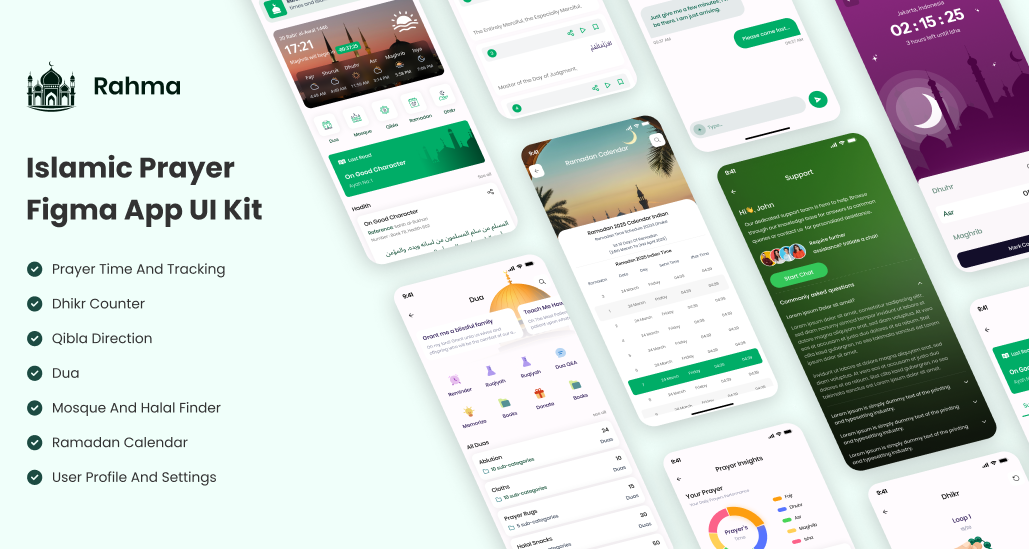
If you're looking for a design foundation that already reflects these 2026 trends, the Rahma Islamic Prayer Tracker Mobile App Figma UI Kit is built specifically for this purpose. It's a clean, modern Figma template designed to help you launch an Islamic prayer tracking app without starting your design process from a blank canvas.
What's Inside the Rahma UI Kit
-
Prayer Time and Tracking screens - clear dashboards showing daily prayers and completion status
-
Dhikr (Tasbeeh) Counter - a digital counter screen designed for smooth, repeated use
-
Qibla Direction screen - an intuitive compass interface
-
Dua Collection - organized screens for browsing supplications
-
Mosque and Halal Finder - location-based screens for nearby mosques and halal spots
-
Ramadan Calendar - dedicated views for the fasting month
-
User Profile and Settings - personalization screens for themes, notifications, and account details
Why This Kit Fits 2026 Design Standards
The Rahma kit uses a religious-appropriate design language - colors, typography, and iconography chosen to feel respectful and calming rather than flashy. Every screen is fully customizable, so you can adjust colors, fonts, and icons to match your own brand while keeping the underlying structure intact. It also supports cross-platform builds, meaning the same design system can guide both your Android and iOS versions.
For teams that want to go further, the structure makes it easy to extend the kit with additional screens like a Fasting Tracker or Community Events section, both of which are becoming standard expectations for prayer apps this year.
Who Should Use This UI Kit
This kit is particularly useful for:
-
Religious organizations and mosques wanting a digital presence for their community
-
Islamic educational institutions building companion apps for students
-
Tech entrepreneurs in Muslim-majority markets looking to launch quickly without hiring a full design team from scratch
Tips for Customizing a Prayer App UI in 2026
-
Keep the next prayer time visible at all times. It's the single most-used piece of information in the app.
-
Use soft, low-contrast color schemes for evening and night modes so users aren't blinded during Fajr or Isha reminders.
-
Make the Dhikr counter tap target large. Users often use it one-handed or without looking directly at the screen.
-
Don't overload the home screen. Push secondary features like the halal finder or community events into a separate tab.
-
Test your Qibla screen on real devices. Compass accuracy and rotation animations matter a lot for user trust.
Final Thoughts
Modern Islamic prayer app UI design in 2026 is about more than aesthetics — it's about creating an interface that genuinely supports someone's daily spiritual routine without friction. Starting with a purpose-built design system like the Rahma Figma UI Kit gives you a strong, respectful visual foundation so your team can focus on the features and refinements that make your app stand out.
Ready to start building? Check out the Rahma Islamic Prayer Tracker Figma UI Kit and explore more Figma UI kits on Bitrix Theme.
FAQ
1. What features should a modern Islamic prayer app include in 2026?
At minimum, accurate prayer times, a Qibla compass, a Dhikr counter, Dua collections, and an Islamic calendar. Many apps now also add mosque finders, halal locators, and Ramadan-specific tools.
2. Is the Rahma UI Kit suitable for both Android and iOS?
Yes, the kit is designed for cross-platform compatibility, so the same screens can guide development on both Android and iOS.
3. Can I customize the colors and fonts in the Rahma Figma UI Kit?
Yes, every element in the kit is fully customizable in Figma, including colors, icons, and typography, so you can align it with your own brand identity.
4. Do I need design experience to use this Figma UI kit?
No. The kit comes with a product description, technical description, and read-me file, making it straightforward for developers to hand off to their design or dev team even without deep Figma expertise.
5. Can I add extra features like a Fasting Tracker to the kit?
Yes, the kit's structure is built to be extended, so you can add screens for features like a Ramadan Fasting Tracker or Community Events section.
