Milling Cutter Runout: Causes, Effects, and Practical Solutions
Author : Surya makeyoueasy | Published On : 31 Oct 2026

Introduction
Milling cutter runout is a common machining issue that can affect dimensional accuracy, surface finish, cutting forces, and tool life. Even a small alignment error can cause some cutting edges to remove more material than others, creating uneven loading and premature wear.
Runout can originate from the spindle, toolholder, collet, cutter shank, or insert seating. Identifying the source is essential for improving machining consistency and avoiding unnecessary tooling costs.
This guide explains milling cutter runout, its causes, effects, measurement methods, and practical solutions for CNC machining.
What Is Milling Cutter Runout?
Milling cutter runout is the variation in the position of a rotating cutter’s cutting edges relative to its intended rotational axis. It can result from misalignment, eccentricity, dimensional errors, or problems with the spindle and tool-holding system.
Runout is commonly assessed using Total Indicated Runout (TIR), the total variation shown by a measuring indicator during one complete rotation.
For example, if a dial indicator shows a minimum reading of 0.00 mm and a maximum of 0.03 mm, the measured TIR is 0.03 mm.
TIR is an indicator reading, not necessarily the actual offset of the cutter axis. The result also depends on where and how the measurement is taken.
Types of Milling Cutter Runout
1. Radial Runout
Radial runout occurs when the cutter’s rotational centre or cutting edges are not consistently aligned with the spindle axis.
Common signs:
-
Uneven loading between cutter teeth.
-
Different wear rates across cutting edges.
-
Poor side-milled surface finish.
-
Dimensional variation in machined features.
2. Axial Runout
Axial runout is variation along the spindle axis, often observed as a difference in the axial position of cutting edges or face-milling inserts.
Common signs:
-
Uneven insert engagement during face milling.
-
Visible steps or uneven marks on a machined face.
-
One or more inserts carrying a disproportionate share of the cutting load.
The measurement location matters: radial runout is checked perpendicular to the axis, while axial runout is checked along it.
Common Causes of Milling Cutter Runout
1. Dirty Spindle Taper or Toolholder
Dust, chips, coolant residue, or small burrs between mating surfaces can prevent the toolholder from seating correctly.
Solution: Clean the spindle taper, toolholder interface, and contact surfaces using approved procedures before installation.
2. Worn or Damaged Collet
A worn, cracked, or incorrectly sized collet may not grip the tool concentrically. Incorrect assembly can also cause poor seating.
Solution: Inspect the collet for damage, use the correct size, and replace worn components.
3. Damaged Cutter Shank
Scratches, dents, wear, or dimensional inaccuracies on the cutter shank can prevent proper alignment inside the holder.
Solution: Inspect the shank and replace damaged tooling rather than compensating with excessive clamping force.
4. Spindle or Toolholder Damage
A damaged spindle taper, worn holder interface, or spindle bearing problem can contribute to excessive runout.
Solution: Measure runout at the appropriate interfaces. If the error remains with different verified holders and tools, arrange a qualified spindle inspection.
5. Incorrect Tool Assembly
Poorly seated tools, incompatible holders, or incorrect clamping procedures can introduce alignment errors.
Solution: Follow the holder manufacturer’s assembly and tightening instructions, and confirm compatibility between the cutter, holder, and spindle.
6. Uneven Insert Seating
In indexable milling cutters, chips beneath an insert, damaged pockets, or inconsistent insert seating can cause axial or radial variation between cutting edges.
Solution: Clean insert pockets, and inspect the seats, and clamp inserts according to the manufacturer’s specified procedure.
Effects of Milling Cutter Runout
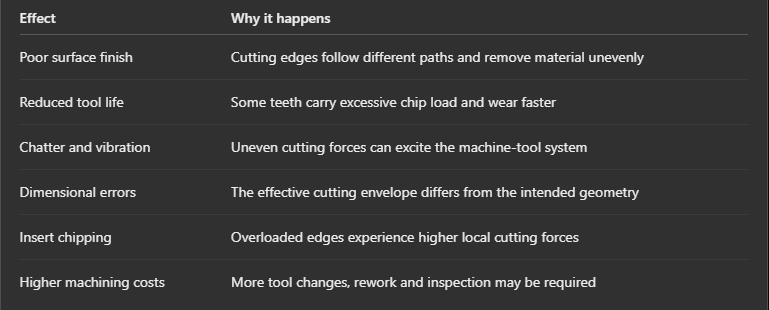
Research on milling runout has shown that uneven tooth loading can affect cutting forces, surface quality, stability, and cutting-edge life. The severity depends on runout magnitude, cutter geometry, cutting conditions, and machine rigidity.
How to Measure Milling Cutter Runout
Use a suitable dial test indicator or dial indicator with adequate resolution and a stable mounting arrangement.
-
Stop the machine safely. Prevent accidental spindle start-up and follow the machine’s safety procedures.
-
Clean the interfaces. Remove chips and contamination from the spindle taper, holder, and cutter.
-
Check the holder. Where appropriate, measure the accessible holder reference surface to help isolate holder-related errors.
-
Install the cutter correctly. Use the specified clamping procedure and ensure the tool is fully seated.
-
Position the indicator. For radial runout, contact a suitable cylindrical reference surface; for axial runout, contact a suitable face.
-
Rotate the spindle manually. With the machine safely stopped, rotate it through one complete revolution using the approved method.
-
Record the readings. Subtract the minimum reading from the maximum to obtain TIR.
-
Compare the result. Check the measured value against the cutter, holder, and machine manufacturer’s limits for that application.
Do not measure directly on irregular flutes or cutting edges unless the measurement method is designed for that geometry. A single measurement location may not reveal every source of runout.
Practical Solutions to Reduce Milling Cutter Runout
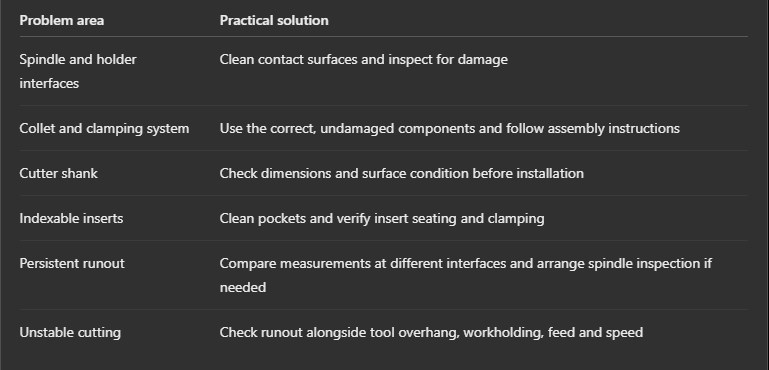
Important: There is no single acceptable runout limit for every milling cutter. Required TIR depends on the tool type, diameter, holder system, machining operation, and accuracy requirements. Use the manufacturer’s specifications rather than applying one universal tolerance.
Why Choose MakeYouEasy?
MakeYouEasy provides CNC tooling information and machining resources to help manufacturing professionals understand cutting tools, toolholding, and machining performance.
Understanding runout measurement and its root causes helps machinists make better maintenance decisions, improve process consistency, and reduce avoidable tooling problems.
Explore machining resources at MakeYouEasy.com.
Conclusion
Milling cutter runout can lead to uneven cutting loads, poor surface finish, dimensional errors, and premature tool wear. Common causes include contaminated interfaces, worn collets, damaged shanks, spindle problems, and incorrect insert seating.
The practical approach is to measure TIR systematically, inspect the complete tool-holding assembly, and correct the source rather than simply changing cutting parameters. Regular cleaning, proper assembly, and manufacturer-approved runout limits help maintain reliable CNC milling performance.
FAQs
1. What is an acceptable milling cutter runout?
The acceptable TIR depends on the cutter, holder, machining operation and accuracy requirements, so consult the manufacturer’s specifications.
2. How does cutter runout affect tool life?
Runout can distribute chip load unevenly between cutting edges, causing excessive wear or premature chipping on the most heavily loaded edges.
3. Can a dirty toolholder cause milling cutter runout?
Yes, chips or contamination between mating surfaces can prevent proper seating and increase measured runout.
4. How do you measure milling cutter runout?
Use a suitable dial indicator to measure radial or axial variation through one full manual spindle rotation while the machine is safely stopped.
5. Can reducing cutter runout improve surface finish?
Yes, reducing excessive runout can improve cutting-edge engagement consistency and surface finish, although other factors such as vibration, feed, and tool condition also matter.
Popular Search Keywords
milling cutter runout, CNC milling runout, cutter runout causes, milling cutter TIR, axial runout, how to measure cutter runout, reduce milling runout, CNC toolholding accuracy, milling cutter vibration, milling surface finish problems.
