How to Resolve WordPress Errors After PHP Updates
Author : 360 Xpert Solution | Published On : 15 Nov 2026
Understanding WordPress Critical Errors After PHP Updates
A WordPress website depends on several components working together, including its core software, themes, plugins, and PHP version. PHP is the programming language that powers WordPress functionality and allows websites to process information, communicate with databases, and display dynamic content. Although updating PHP is important for improving website security, compatibility, and performance, the process can sometimes create unexpected technical problems. One common issue website owners encounter is a wordpress critical error after php update which can make a website inaccessible or prevent certain features from functioning correctly.
This problem usually occurs when an installed plugin, active theme, or outdated piece of custom code is incompatible with the newly installed PHP version. For example, a website running older plugins may continue functioning properly on an earlier PHP release but experience fatal errors after upgrading to a newer version. In some situations, visitors may see a critical error message instead of the homepage, while administrators may lose access to the WordPress dashboard. Understanding why these errors happen is the first step toward restoring normal website functionality without affecting important website data.
How to Identify the Actual Cause of the Error
Before making changes to a WordPress website, it is important to determine which component is responsible for the problem. Randomly disabling plugins, editing files, or changing server settings can create additional complications.
The WordPress recovery mode is a useful starting point when a critical error occurs. In certain situations, WordPress sends an automated recovery email to the website administrator. This message may identify the problematic plugin or theme and provide a special recovery link that allows administrators to access the dashboard.
Another effective approach is enabling WordPress debugging. The debugging feature records technical information about errors that occur during website execution. Administrators can enable it through the wp-config.php file by adjusting the relevant debugging settings. Error logs can reveal which plugin, theme, or PHP function is responsible for the failure.
Hosting control panels also commonly provide access to PHP error logs. These logs contain useful information about fatal errors, unsupported functions, and memory-related problems. Reviewing the timestamps can help administrators connect a specific error with the PHP update.
Identifying the exact source of the problem makes troubleshooting more efficient and reduces the possibility of unnecessary website modifications.
Practical Methods for Restoring Website Functionality
Once the cause has been identified, the next step is restoring the website. Creating a complete backup before making technical changes is essential. A backup should include website files and the database so that the previous working version can be recovered if something goes wrong.
If a plugin is responsible for the issue, temporarily deactivating it may restore website functionality. When dashboard access is unavailable, administrators can use the hosting file manager or an FTP client to access the wp-content/plugins directory. Renaming the suspected plugin folder temporarily prevents WordPress from loading that plugin.
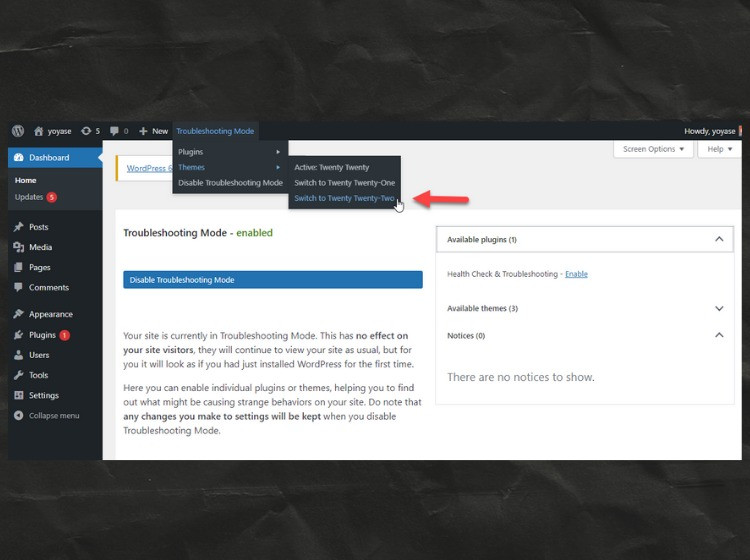
If the problem is related to the active theme, switching temporarily to a default WordPress theme can help determine whether theme compatibility is responsible. Administrators should also check whether the theme developer has released an update that supports the installed PHP version.
In some situations, temporarily switching back to the previous PHP version may restore access to the website. This should be considered a temporary recovery measure rather than a permanent solution. Older PHP versions may no longer receive security updates, making it important to resolve the underlying compatibility problem.
Increasing the PHP memory limit can also help when error logs indicate memory exhaustion. However, this adjustment should only be made when memory limitations are actually contributing to the problem. After implementing a fix, administrators should test the homepage, dashboard, important pages, forms, and other essential website functions.
Preventing Similar Problems During Future PHP Updates
Preventing PHP-related errors requires a proactive website maintenance strategy. Website owners should avoid updating PHP on a live website without first checking whether their themes and plugins support the intended version.
A staging environment provides a safer place to test technical changes. It creates a separate copy of the website where administrators can install updates, check compatibility, and identify errors without affecting visitors. Once everything works correctly, the tested changes can be implemented on the live website.
Regular backups are another important part of website protection. Automated backup solutions can help preserve website files and databases, making recovery easier when unexpected problems occur.
Keeping WordPress core, plugins, and themes updated also reduces compatibility risks. However, updates should be reviewed before installation, particularly when a website uses custom-developed functionality. Removing inactive and unsupported plugins can further reduce security vulnerabilities and technical conflicts.
Website owners should also maintain communication with their hosting providers. Hosting support teams can provide information about available PHP versions, server configurations, and error logs. Their assistance can be particularly valuable when the problem originates from the server environment rather than WordPress itself.
Choosing Professional Assistance for Reliable WordPress Recovery
Some WordPress errors require more than basic troubleshooting, particularly when they involve complicated plugin conflicts, customized themes, database problems, or server configuration issues. Attempting unfamiliar technical modifications without understanding their consequences can result in additional downtime or data loss.
Professional WordPress developers can investigate error logs, identify incompatible code, restore website functionality, and test important features. They can also review the website's technical configuration to determine whether additional improvements are necessary.
A reliable technical team does not simply remove the visible error message. Instead, it investigates the underlying cause and implements an appropriate solution that supports long-term website stability. This approach is especially important for business websites, online stores, and service-based platforms where unexpected downtime can affect customer confidence and revenue.
Professional maintenance can also include security checks, performance optimization, backup configuration, plugin compatibility reviews, and ongoing monitoring. These services help businesses maintain a dependable website while reducing the likelihood of similar technical problems.
Why Timely WordPress Fixes Matter for Website Performance
Resolving technical problems quickly is important for maintaining website accessibility, search engine visibility, and user satisfaction. When a website becomes unavailable, visitors may leave without finding the information or services they need. Repeated downtime can also negatively affect a business's online reputation.
A proper wordpress fix should address the actual source of the problem instead of relying on temporary adjustments that only hide its symptoms. Whether the issue involves an outdated plugin, incompatible theme, unsupported PHP function, or server configuration, identifying the underlying cause helps prevent recurring failures.
The most effective solution involves identifying the actual source of the error and correcting it without compromising website security or important data. By following a consistent maintenance strategy and seeking professional assistance when necessary, website owners can minimize downtime, improve performance, and ensure their WordPress websites continue delivering a dependable experience to visitors.
Conclusion
PHP updates are an important part of maintaining a secure and efficient WordPress website, but compatibility problems can occasionally interrupt normal operations. Understanding common error symptoms, reviewing debugging information, checking plugin and theme compatibility, and maintaining reliable backups can make recovery considerably easier.
Website owners should prioritize safe troubleshooting, regular maintenance, and compatibility testing whenever PHP updates are planned. Businesses that need dependable technical assistance can consider 360xpertsolution.com for WordPress troubleshooting, error resolution, and website maintenance support. With the right technical approach, WordPress websites can remain secure, functional, and prepared for future software updates.
