How to Fix WordPress Errors and Improve Website Performance
Author : 360 Xpert Solution | Published On : 30 Oct 2026
Understanding the Causes of WordPress Critical Errors
WordPress is one of the most popular platforms for building websites, but even a well-maintained website can experience unexpected technical problems. A critical error may prevent visitors from accessing important pages or stop administrators from logging into the dashboard. When this happens, finding a reliable wp critical error fix becomes essential for restoring website functionality and protecting the user experience. These errors can result from incompatible plugins, outdated themes, incorrect PHP configurations, exhausted server resources, or corrupted website files.
Understanding the underlying cause is the first step toward an effective solution. Instead of making random changes, website owners should identify recent updates, review error messages, and examine available server logs. A systematic troubleshooting process can help resolve the problem while reducing the risk of data loss. Regular backups and careful maintenance also make it easier to recover a website if an unexpected failure occurs.
Practical Ways to Troubleshoot WordPress Issues
When a critical error appears, begin by checking whether the WordPress administration dashboard is accessible. If it is, review recent plugin and theme updates and temporarily deactivate any extensions that may be responsible. If the dashboard is unavailable, a hosting control panel or secure file transfer connection may provide another way to disable a suspected plugin by renaming its directory.
Enabling WordPress debugging can reveal useful information about the source of a failure. However, debugging should be handled carefully, especially on a live website. Error details should not be displayed publicly because they may reveal sensitive server paths or technical information. Website owners should review the relevant logs privately and disable public debugging output after troubleshooting.
Before modifying core files, themes, or configuration settings, create a complete backup whenever possible. If the problem began immediately after an update, restoring a compatible version or using a verified backup may be the safest approach. For database-related errors, checking database credentials and server connectivity can help determine whether the issue originates outside the WordPress application itself.
Why Website Maintenance Prevents Recurring Errors
Resolving an existing error is important, but preventing future problems is equally valuable. Routine maintenance keeps WordPress installations secure, stable, and compatible with modern hosting environments. Website owners should update the WordPress core, themes, and plugins regularly while checking compatibility before applying major changes.
Testing significant updates on a staging website can reduce the risk of unexpected disruptions. A staging environment allows administrators to identify conflicts before changes reach the live website. Automated backups, uptime monitoring, security scans, and periodic database maintenance provide additional protection against common technical failures.
It is also important to remove unused plugins and themes. Every unnecessary component can increase maintenance requirements and potentially introduce security or compatibility risks. A streamlined WordPress installation is generally easier to manage, troubleshoot, and optimize over time.
The Connection Between Website Speed and Stability
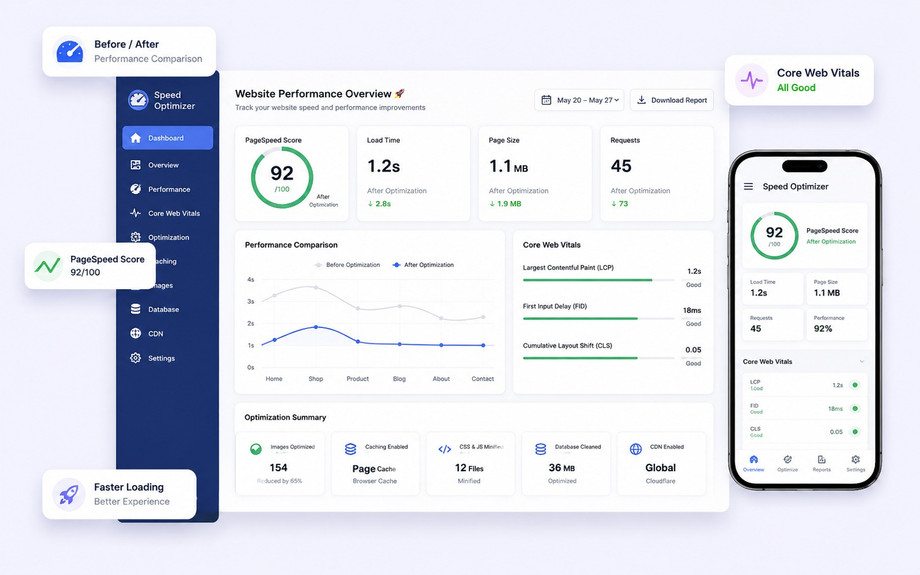
Website performance influences visitor satisfaction, engagement, and the overall effectiveness of a digital presence. Slow-loading pages can discourage potential customers, while unstable functionality may interrupt important activities such as purchases, registrations, and contact form submissions. Although speed problems and critical errors are not identical, both can result from inefficient code, inadequate hosting resources, or poorly configured website components.
Caching can reduce repeated processing by serving previously generated content more efficiently. Image compression helps decrease page weight, while minimizing unnecessary scripts and stylesheets can reduce the amount of work required to render a page. A content delivery network may also improve loading times for visitors located far from the origin server.
Performance improvements should be based on measurable results rather than assumptions. Tools that evaluate page speed, server response times, and Core Web Vitals can help identify the most important bottlenecks. By addressing the underlying causes of poor performance, website owners can create a faster and more reliable browsing experience without sacrificing essential functionality.
Choosing a WordPress Optimization Expert for Long-Term Results
When technical issues become difficult to diagnose, professional assistance can save time and reduce the likelihood of further damage. A wordpress optimization expert can assess a website's configuration, investigate recurring errors, evaluate plugin compatibility, and identify opportunities to improve performance. Professional support may be particularly useful for business websites that depend on continuous availability, reliable transactions, and consistent search visibility.
A thorough optimization process should begin with an assessment of the website's current condition. This may include reviewing hosting resources, measuring loading speed, checking database efficiency, analyzing scripts, and identifying unnecessary plugins. Based on these findings, the specialist can recommend targeted improvements rather than applying generic changes that may not address the actual problem.
Website owners should also look for professionals who prioritize security, backups, transparent communication, and measurable performance improvements. Technical changes should be documented so that future maintenance remains manageable. A qualified specialist can help establish an ongoing maintenance plan that includes software updates, regular testing, security monitoring, and performance reviews. These practices support a more dependable website and reduce the likelihood of recurring disruptions.
Conclusion: Build a Faster and More Reliable Website
Maintaining a successful WordPress website requires more than publishing content and updating pages. It involves identifying technical problems, maintaining compatible software, monitoring performance, and protecting important website data. When a critical error occurs, a structured troubleshooting process can help restore functionality while minimizing unnecessary risks. Preventive maintenance and performance monitoring further reduce the chances of similar problems affecting visitors in the future.
Investing in professional technical support can also make website management more efficient, particularly when complex errors or persistent speed issues interfere with business operations. With the right maintenance strategy, website owners can improve stability, strengthen security, and provide a smoother experience for their audiences. For businesses seeking dependable WordPress troubleshooting and performance support, 360xpertsolution.com can be considered as a resource for addressing website challenges and maintaining a more effective online presence.
