Finding a Clover Payment Terminal That Matches Your Industry
Author : Obvio Solutions | Published On : 21 Aug 2026
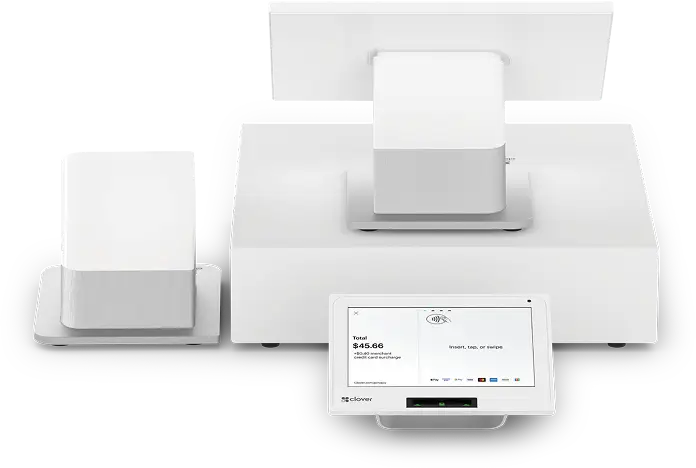
Not every Clover payment terminal does the same job. They can look similar on the surface, but put the wrong one on your counter and you will feel it quickly.
Many Canadian businesses have gone through exactly that. Choosing based on price or habit alone tends to cost time at checkout every single day. A terminal should work with your business, not against it.
This guide covers three Clover payment terminals worth knowing and which industries they actually suit. The goal is straightforward: help you choose the right fit the first time and save yourself the headache later.
Why the Wrong Payment Terminal Costs You More Than You Think
Picking a terminal without thinking about your business is one of the most common mistakes. The cost shows up in ways that are easy to miss at first.
-
Slow checkouts push customers away. A terminal not built for busy retail struggles during peak hours. People notice the wait, and some simply leave.
-
Staff training takes longer than it should. More clicks and confusion means more time teaching new employees how to work around the system.
-
You end up paying for features you never use. Some terminals come loaded with tools built for completely different industries.
-
Glitches happen at the worst times. A system under constant strain is far more likely to act up during a rush.
Three Clover Payment Terminals Worth Knowing
Clover has built terminals for different types of businesses. Here are the three that come up most often for Canadian merchants.
Clover Station Duo: Built for Busy Counters
This is a full countertop setup with two screens. One faces the merchant, one faces the customer. Restaurants, grocery stores, and liquor retailers tend to rely on it most. It handles inventory, employee tracking, and reporting all in one place. For any business moving through 100 or more transactions a day, it holds up well.
Clover Mini: Small Counter Space, Full Capability
The Mini fits where other terminals do not. It has a touchscreen, a built-in receipt printer, and accepts every major payment type. Salons, boutiques, and small cafes use it regularly. It runs the full Clover app ecosystem, so businesses can add tools like loyalty programmes or appointment booking as they grow.
Clover Flex: Takes Payment Wherever You Are
The Flex is wireless and handheld. It works over Wi-Fi or cellular, making it the go-to for tradespeople, market vendors, and table-service restaurants. Customers pay on the spot, card in hand.
How to Match the Right Clover Payment Terminal to Your Industry
Choosing a terminal gets easier once you stop thinking about the hardware and start thinking about how your business actually runs day to day.
Step 1: Know Your Transaction Volume
High-volume businesses need terminals built for speed and durability. A busy restaurant or retail shop pushing through hundreds of transactions daily needs something that keeps up. A low-volume business does not need to overspend on capability it will rarely use.
Step 2: Think About Where Payment Happens
Does payment happen at a fixed counter, at the table, or out in the field? That one question narrows things down fast. Mobile businesses and tradespeople need wireless capability. Counter-based businesses need stability and screen space.
Step 3: Look at the Software, Not Just the Hardware
Every Clover terminal runs apps. A salon needs booking tools. A restaurant needs kitchen display support. A retailer needs solid inventory tracking. Matching the software ecosystem to your workflow matters just as much as the physical terminal sitting on your counter.
What Canadian Business Owners Should Ask Before Signing a Payment Agreement
The terminal is only part of the decision. The agreement attached to it matters just as much. Before signing anything, these are the questions worth asking out loud.
Is the Terminal Leased or Do You Own It?
This one catches a lot of business owners off guard. Leasing means monthly payments that add up over time, often costing more than the hardware is worth. Owning the terminal outright gives you more flexibility if you ever want to switch providers. Always ask this question before assuming either way.
What Are the Monthly Fees and Processing Rates?
Flat monthly fees and per-transaction rates vary quite a bit between providers. Some charge for software access on top of hardware costs. Others bundle everything together. Get the full breakdown in writing and compare the total monthly cost, not just the rate on individual transactions.
Are There Early Termination Penalties?
Some payment agreements lock businesses in for two or three years. Leaving early can come with fees that hurt. Read the contract length carefully and ask directly what it costs to exit before the term ends.
What Does Local Support Look Like?
This matters more than most people expect. If the terminal goes down during a Friday evening rush, you need to reach someone fast. Ask whether support is available by phone, what the response time is, and whether there is any on-site help available for Canadian merchants specifically. Remote-only support from overseas can leave you stuck at the worst possible moment.
The Right Clover Payment Terminal Makes a Real Difference
Choosing the right Clover payment terminal comes down to knowing your business well. Transaction volume, counter space, and daily workflow all point toward the right answer when you take the time to look at them honestly.
The hardware, the software, and the agreement all need to work together. Getting one right and ignoring the others can still create problems down the line. Take the full picture into account before making a final call.
