FANUC Spindle Encoder (Position Coder): Complete Guide to Working, Applications & Troubleshooting
Author : Surya makeyoueasy | Published On : 21 Oct 2026
Introduction
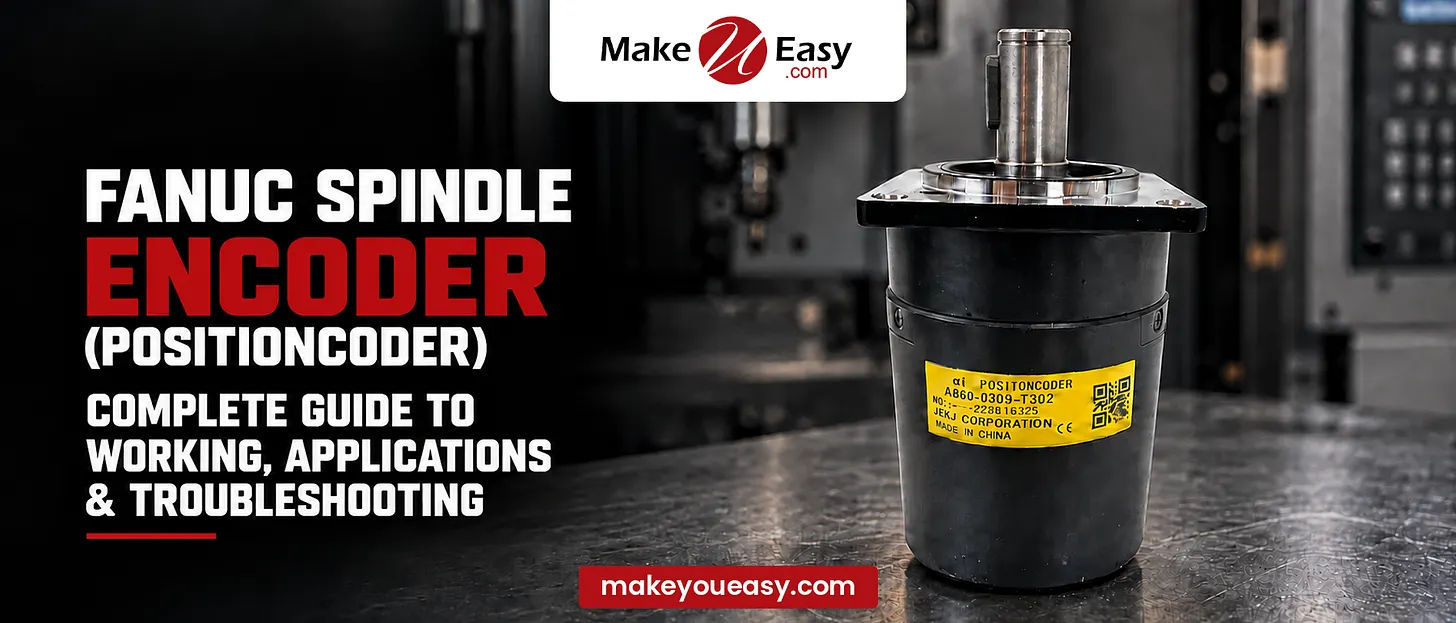
A FANUC spindle encoder, also known as a position coder in certain CNC systems, is an important component used to monitor spindle position, speed, and rotational synchronization. It provides feedback to the CNC controller, helping the machine perform operations such as rigid tapping, threading, and spindle orientation with greater accuracy. Understanding how a spindle encoder works, where it is used, and how to troubleshoot common faults helps CNC operators and maintenance engineers reduce downtime and maintain machining performance.
What Is a FANUC Spindle Encoder (Position Coder)?
A FANUC spindle encoder is a feedback device that detects spindle rotation and sends corresponding signals to the CNC control system. Depending on the machine configuration, the system may use an encoder, a position coder, or another spindle feedback device to obtain rotational position and speed information.
The position coder is particularly relevant in applications requiring the spindle to stop at a specific angular position or synchronize with another machine movement. The exact device and feedback arrangement depend on the FANUC control series and the machine builder’s design.
How Does a FANUC Spindle Encoder Work?
The spindle encoder converts mechanical rotation into electrical signals that the CNC controller can interpret.
Its working process generally involves the following steps:
-
Spindle Rotation: The spindle rotates during machining, driven by the spindle motor.
-
Position Detection: The encoder detects rotational movement using its sensing mechanism.
-
Signal Generation: It produces electrical feedback signals corresponding to spindle movement and, depending on the device, reference position.
-
Feedback Processing: The CNC or spindle control system interprets the signals to determine rotational speed and position.
-
Motion Synchronization: The controller uses this information to coordinate spindle movement with other machine axes when the operation requires it.
The encoder’s accuracy, mounting condition, signal integrity, and compatibility with the control system all influence reliable operation.
Key Applications of a FANUC Spindle Encoder
1. Rigid Tapping
Rigid tapping synchronizes spindle rotation with the axial movement of the Z-axis. Accurate spindle feedback helps maintain the required relationship between spindle rotation and thread pitch, reducing the risk of damaged threads or tools.
2. CNC Thread Cutting
In threading operations, spindle position feedback helps synchronize cutting-tool movement with spindle rotation. This is particularly important for maintaining consistent thread pitch over successive passes.
3. Spindle Orientation
Some CNC machining centers require the spindle to stop at a defined angular position for tool changing or other machine functions. A suitable position feedback device helps the control system achieve the required orientation.
4. Spindle Speed Monitoring
Feedback from the spindle system can help the controller monitor actual rotational speed and detect discrepancies between commanded and measured operation.
5. Synchronized Machining
Certain CNC operations require coordinated spindle and axis movements. Depending on the machine configuration, encoder feedback supports these synchronized functions.
Common FANUC Spindle Encoder Problems and Solutions
Encoder-related alarms or spindle malfunctions may result from electrical faults, mechanical issues, incorrect parameters, or problems elsewhere in the spindle feedback system.
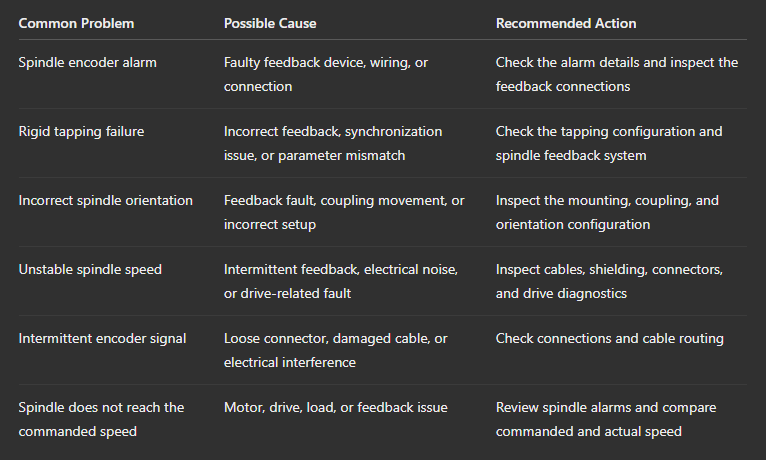
Important: These are general troubleshooting possibilities, not diagnoses for every FANUC machine. Check the exact CNC model, spindle configuration, machine-builder documentation, and alarm number before replacing components or changing parameters.
Step-by-Step Troubleshooting Guide
Step 1: Identify the Alarm
Record the exact alarm number and message displayed on the CNC screen. Consult the relevant FANUC maintenance manual and machine-builder documentation to identify the affected feedback system.
Step 2: Inspect the Encoder Connections
With the machine safely shut down according to the manufacturer’s procedures, inspect accessible connectors, cables, and mounting points for looseness, damage, contamination, or signs of wear.
Step 3: Check the Feedback Cable
Look for crushed cables, damaged insulation, poor shielding, loose connectors, or routing near sources of electrical interference. Do not disconnect feedback cables while the system is powered unless the approved service procedure explicitly permits it.
Step 4: Review Spindle Diagnostics
Use the CNC’s supported diagnostic screens to check available spindle speed, position, and feedback status information. Compare the readings with the relevant service documentation.
Step 5: Inspect Mechanical Mounting
If the design permits, have a qualified technician check the encoder coupling, mounting arrangement, and mechanical connection for looseness or misalignment.
Step 6: Verify Parameters and Configuration
Confirm that the encoder type and spindle feedback configuration match the machine’s approved specifications. Avoid changing parameters without the correct backup, documentation, and authorization.
Step 7: Test the Machine Safely
After completing the checks, follow the manufacturer’s commissioning procedure and test the affected spindle function under controlled conditions. If the alarm persists, escalate the issue to a qualified CNC service technician.
Maintenance Tips for Better Encoder Performance
-
Inspect accessible encoder cables and connectors during scheduled maintenance.
-
Keep connectors and surrounding areas free from coolant contamination and excessive debris.
-
Check encoder mounting and coupling condition when permitted by the machine design.
-
Maintain proper cable shielding and separation from high-power electrical wiring.
-
Record recurring alarms and the conditions under which they occur.
-
Follow the recommended maintenance intervals and replacement procedures.
-
Keep a backup of approved CNC parameters before authorized service work.
Regular preventive maintenance can help identify developing feedback problems before they cause extended machine downtime.
Frequently Asked Questions (FAQ)
1. What is a FANUC spindle encoder used for?
It provides spindle feedback used for functions such as speed monitoring, rigid tapping, threading synchronization, and spindle orientation, depending on the machine configuration.
2. Is a position coder the same as a spindle encoder?
The terms are sometimes used interchangeably in CNC environments, but they are not universally identical. Their meaning depends on the FANUC control, feedback device, and machine-builder terminology.
3. Can a faulty spindle encoder affect rigid tapping?
Yes. Incorrect or missing spindle position feedback can prevent proper synchronization between spindle rotation and axis movement, potentially causing tapping errors or alarms.
4. What causes a FANUC spindle encoder alarm?
Possible causes include a damaged encoder, loose connectors, broken feedback cables, electrical interference, mechanical mounting problems, or an issue with the associated drive or control configuration.
5. Should I replace the encoder when an alarm appears?
Not immediately. First identify the exact alarm and inspect the feedback connections, cables, diagnostics, and mechanical installation. Replace the encoder only when testing and the relevant service documentation support that diagnosis.
Popular Search Keywords
FANUC spindle encoder, FANUC position coder, CNC spindle encoder working, FANUC encoder alarm, spindle encoder troubleshooting, CNC rigid tapping problems, FANUC spindle orientation, CNC spindle feedback system, spindle encoder maintenance, FANUC CNC spindle repair.
