Claude Fable 5 workflows for Google + Meta Ads.
Author : get- ryze.ai | Published On : 26 Jun 2026
Claude Fable 5 dropped this week. We plugged it into live Google and Meta accounts on day one.
The new model doesn’t answer questions about your ads. It runs them. Here’s what it does — and the copy-paste prompts to use it on your account today.
What Fable 5 does better for paid ads →
Spies on competitor ads — groups by hook, format + CTA — 2-hr scroll → one prompt →
Finds wasted spend — flags $200+ / 0-conv search terms, paste-ready as negatives →
Catches creative fatigue early — CTR −20% from peak or freq > 3.0 — before ROAS drops →
Generates the next creative batch — top-ROAS ads → copy variants + image prompts, brief-ready →
Checks budget pacing — daily spend vs. monthly targets, flags 15%+ drift →
Audits PMax — ranks asset groups by ROAS, calls out dead ones eating budget →
Writes Monday’s report — spend, ROAS, top movers, 3 priorities — before the team logs on
Each capability below has the copy-paste prompt and suggested cadence. Connect the Ryze MCP once to give Claude live access to your accounts — then paste any prompt into a scheduled task and walk away.
Stage 1: Audit — competitor intel, waste, PMax
Stage 2: Structure — build accounts that scale profitably
Stage 3: Creative — catch fatigue early, ship the next batch
Stage 4: Measure — pace budgets, prove what’s incremental
Stage 5: Scale — tell the story, repeat the cycle
Table of Contents
How to schedule these in Claude
1 · Audit — competitor intel, waste, PMax
2 · Structure — build accounts that scale profitably
3 · Creative — catch fatigue early, ship the next batch
4 · Measure — pace budgets, prove what’s incremental
5 · Scale — tell the story, repeat the cycle
Bonus · Paid Media Command Center MCP
Setup: connect Google + Meta in 30 seconds
Frequently asked questions
How to schedule these in Claude
The 5-stage operating system — shown here as the original nine workflows; Fable 5 adds three more below — plus one MCP that connects the whole stack.
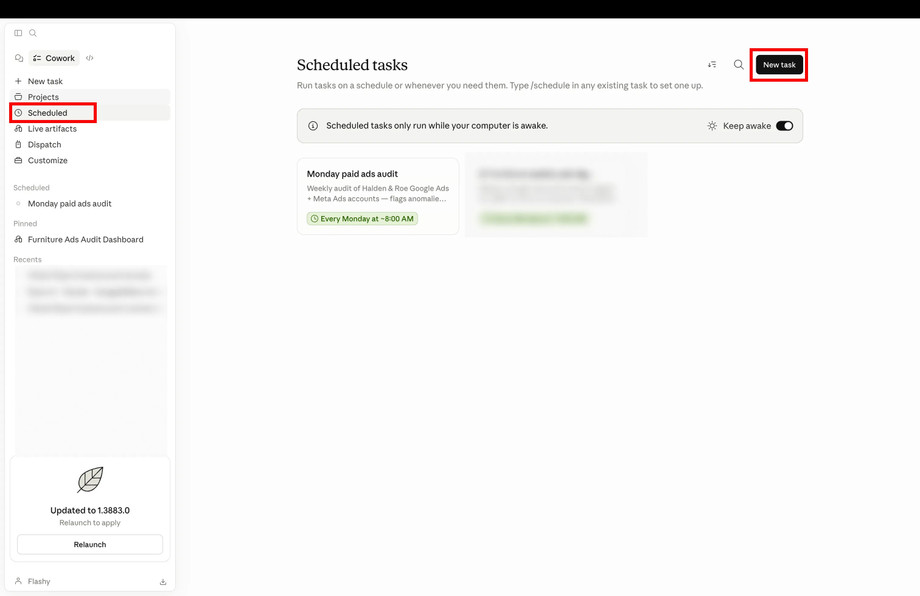
The schedule layer in three steps. 1) Open Claude Cowork → Scheduled, click New task. 2) Paste one of the 12 prompts below, give it a name, pick a frequency (daily / weekly / specific time). 3) Save. The task fires on schedule and the result lands in your Claude conversation.
Claude Cowork → Scheduled. The pane lists tasks already running on cron; New task in the top right opens the create modal. Schedules fire while your computer is awake — Cowork ships a “Keep awake” toggle for laptops.
The Create scheduled task modal — this is what you fill in for each of the 12 prompts below. Name it descriptively, paste the prompt verbatim, pick the frequency, save.
The Ryze MCP is the other half: it gives Claude live access to Google Ads, Meta Ads, GA4, Shopify, and your CRM at the moment a scheduled task fires. Without it, Claude has nothing to read or act on. With it, every scheduled prompt queries fresh data and (when the prompt asks for it) writes back to the platform.
Each card below has the prompt and a recommended cadence. Edit any prompt before saving — they’re plain text. For variants on each, see the public prompt library.
1 · Audit — competitor intel, waste, PMax
Four workflows that run before you touch a single campaign setting. Know what competitors are running, where your own spend is leaking, whether your data is clean, and which PMax asset groups are dragging down ROAS.
01 · Competitor Ad Spy Fable 5
Map every ad your competitor is running
Pulls every active ad from any competitor in Meta Ads Library. Groups by hook type, format, and CTA pattern. What used to be a 2-hour scroll takes one prompt. PromptPull all active ads from [competitor domain] in Meta Ads Library. Group by hook type, format, and CTA. Summarize the 3 most common angles and flag any offer we are not currently testing. Suggested cadence: On–demand · Mode: read-only
02 · Account Audit Agent
Find waste, spot hidden leaks
Sweeps every campaign, ad set, and ad. Surfaces single-keyword ad groups, fatigued ad sets, broken UTMs, and budgets on dead campaigns — ranked by $-impact. PromptAudit my Google + Meta accounts last 7 days. Flag single-keyword ad groups, ad sets above frequency 4, broken UTMs, disapproved creatives, budgets stuck on dead campaigns. Rank by $-impact. Suggested cadence: Weekly · Mondays 8am · Mode: read-only
03 · Signal Quality Auditor
Validate data quality, strengthen signals
Checks the conversions auto-bidding depends on. Flags duplicate Google tags, missing Meta CAPI events, GA4 gaps. Returns a fix list ranked by bid-quality impact. PromptValidate my conversion signals. Check Google for duplicate tags, Meta for missing CAPI events, GA4 for attribution gaps. Return a fix list ranked by impact on auto-bid. Suggested cadence: Daily 7am · Mode: read-only
04 · PMax Auditor Fable 5
Rank asset groups, kill the dead weight
Ranks every PMax asset group by ROAS and calls out the ones eating budget with nothing to show. Gets specific: which assets to pause, which to replace, which to test next. PromptPull all PMax asset groups, ranked by ROAS. Flag any group spending more than $[X]/day below target ROAS [Y]. List each dead asset and the recommended action: pause, replace, or test. Suggested cadence: Weekly · Mondays · Mode: read-only
2 · Structure — build accounts that scale profitably
Once the leaks are patched, the question becomes architecture. These two workflows decide what the next campaign should look like and where the next dollar should go — based on what real users searched for and where they actually converted.
05 · Campaign Architecture Builder
Design structures that scale profitably
Proposes a campaign + ad-set tree from your product taxonomy and conversion history. Knows when to consolidate low-volume ad sets and when to split a winning angle into its own budget. PromptPropose a campaign + ad-set tree for [product line] based on my taxonomy, target ROAS [X], and last 90 days conversion data. Flag what to consolidate and what to split, with rationale. Suggested cadence: Monthly · first Monday · Mode: read-only
06 · Wasted Spend Finder
Flag $200+ spend / 0-conversion terms instantly
Reads search terms (Google) + Advantage+ placements (Meta). Flags every term with $200+ spend and zero conversions — the leak every account has. Returns a paste-ready negative keyword list. PromptPull last 30 days search terms (Google) and Advantage+ placements (Meta). Cluster by intent, surface zero-conversion negatives, give me a paste-ready negative + exclusion list. Suggested cadence: Weekly · Wednesdays 9am · Mode: writes (negatives only — review prompt before saving)
3 · Creative — catch fatigue early, ship the next batch
Three workflows that keep creative ahead of the curve: detect fatigue before ROAS drops, generate the next batch from what’s already winning, and close the post-click gap between ad and landing page.
07 · Creative Fatigue Detector Fable 5
Catch declining ads before ROAS drops
Flags ads with CTR down 20%+ from their 7-day peak, or frequency above 3.0 — before the ROAS drops, not after. Gets specific: which ads to refresh, which to kill. PromptFind all active ads where CTR has dropped 20%+ from their 7-day peak, or frequency is above 3.0. Flag each with current vs. peak stats and recommend: refresh the creative, rotate the audience, or pause. Suggested cadence: Weekly · Thursdays · Mode: read-only
08 · Creative Batch Generator
Next batch from your top-ROAS ads
Takes your top ads by ROAS and drafts copy variants + image prompts that build on the same angles. Format specs, do/don’t list, three angle directions — brief-ready in minutes. PromptTake my top 5 ads by ROAS from the last 30 days. For each, write 3 copy variants that build on the same angle, plus one image prompt. Format as a brief with format specs and do/don’t list. Suggested cadence: Monthly · first Monday · Mode: read-only
09 · Landing Page Match Reviewer
Align message and page, reduce friction
Side-by-sides ad copy with the destination page. Flags message mismatch, CTA mismatch, broken hero, slow LCP. Returns a prioritized fix list for design. PromptCompare my top 5 ads (by spend) against their destination pages. Flag message mismatch, CTA mismatch, broken hero, slow LCP. Output a prioritized fix list. Suggested cadence: Bi-weekly·Tuesdays · Mode: read-only
Get a free instant audit
Get a free, instant read on your paid ads or SEO — and fix it right away. $$
Paid ads audit
Catch wasted spend & broad-match leaks
Find account structure gaps
Rank your quickest wins
Spot PMax & brand-search overlap
Check conversion-tracking health
Benchmark CPC vs your industry
Catch wasted spend & broad-match leaks
Find account structure gaps
Rank your quickest wins
Spot PMax & brand-search overlap
Check conversion-tracking health
Benchmark CPC vs your industry
Get my free audit
Free · no credit card · instant 1
SEO audit
Find keyword & ranking gaps
Catch technical SEO issues
Rank your fastest wins
Surface thin & duplicate pages
Check indexing & crawl coverage
Compare backlinks vs competitors
Find keyword & ranking gaps
Catch technical SEO issues
Rank your fastest wins
Surface thin & duplicate pages
Check indexing & crawl coverage
Compare backlinks vs competitors
Get my free audit
Free · no credit card · instant
4 · Measure — pace budgets, prove what’s incremental
The two workflows that earn you the next budget approval. One reallocates spend across what’s already working; the other designs the test that tells you whether any of it was incremental.
10 · Budget Reallocation Modeler
Catch pacing drift, move spend to what works
Checks daily spend vs. monthly targets and flags any campaign drifting 15%+ off pace. Then models 3 reallocation scenarios using marginal ROAS curves — returns the recommended move and the exact UI changes. PromptCheck daily vs. monthly budget pacing across all campaigns. Flag anything 15%+ off target. Then model 3 scenarios for shifting [$X] using marginal ROAS curves — return the recommended moves + UI steps. Suggested cadence: Mid-month + month-end · Mode: read-only (writes only when you ask)
11 · Incrementality Test Planner
Plan tests that prove real impact
Designs the geo-holdout, conversion-lift, or PSA test that lets you defend “is this spend incremental” to the CFO. Sizes from variance, picks control, sets duration, scripts analysis. PromptDesign a geo-holdout test for [campaign / channel]. Size from historical variance, pick the right control geo, set the duration, and draft the analysis script I’ll run when it’s done. Suggested cadence: On-demand · Mode: read-only
5 · Scale — tell the story, repeat the cycle
Scaling isn’t a workflow — it’s the result of doing the first eleven on a cadence. The twelfth workflow is what makes the cadence stick, because it makes Monday’s report write itself.
12 · Weekly Performance Narrator
Tell the story behind the numbers
Reads the week’s data across Google + Meta + GA4. Identifies the three things that mattered. Drafts the Monday report with the “what changed / why / next action” structure executives expect — not another dashboard, a written narrative your team will actually read. PromptRead this week’s data across Google Ads + Meta Ads + GA4. Identify the 3 things that mattered most. Draft Monday’s report with charts and the “what changed / why / next action” structure. Tone: confident, no fluff, exec-readable. Suggested cadence: Weekly · Mondays 8am · Mode: read-only · most-loved scheduled prompt in our base Bonus
The connector that makes it all work
Paid Media Command Center MCP
The 12 prompts above all need the same thing — live access to Google Ads, Meta Ads, GA4, Shopify, your CRM, your sheets, and your creative library. The MCP is one URL you paste into Claude Desktop. After that, every scheduled prompt runs against a single connected stack. No CSV exports, no per-tool authentication, no stale data.
Connect your stack · one source of truth Google Ads
  Meta Ads Shopify CRM CRM Sheets Sheets Creative Library
Paste any of the 12 prompts into Claude Cowork’s Scheduled tasks, pick a frequency, save. Connect Ryze’s MCP first so each scheduled task can read your live ad data. No prompt-engineering required — the prompts are above, the cadences are above; you’re five minutes from your weekly cadence running itself.
Yael S.
Head of Performance
DTC apparel, $180K/mo spend ★★★★★ “
We pasted six of the twelve prompts into Claude Cowork’s scheduled tasks on a Monday. By the next Monday they were running themselves on cron — the Audit Agent caught $2,400/month in waste in the very first run.” Book a demo
6 of 12
Prompts scheduled wk 1
$2,400
Waste caught /mo
half-day
Saved /wk instantly
Setup: connect Google + Meta in 30 seconds
All 12 workflows above require live data access. One MCP URL is all it takes — paste it into Claude Desktop once, and every scheduled prompt runs against fresh, real-time account data. No CSV exports, no copy-paste between tabs.
VISIT US :-
https://www.get-ryze.ai/blog/9-claude-workflows-for-google-and-meta-ads
