ChatGPT Atlas for Shopify: what merchants need
Author : Surfient Surfient | Published On : 15 Jul 2026
ChatGPT Atlas isn't another traffic source — it's an agent. When a shopper asks “best standing desk under $700 for a small apartment,” Atlas doesn't link them out. It renders shoppable cards, posts to your /cart/add.js endpoint on their behalf, and hands them off into a populated Shopify checkout. If your schema, your endpoints, or your WAF rules aren't configured for that round-trip, you're invisible in agentic shopping — no matter how well you rank in standard citations.
What Atlas actually is
Atlas is OpenAI's shopping surface inside ChatGPT. From the shopper's perspective it looks like ChatGPT answered their question with product cards that have Add to cart and Checkout buttons. From the merchant's perspective it's a programmatic consumer of your site — it reads your schema, fetches your product JSON, posts to your cart endpoint, and redirects the shopper to your checkout URL. Everything that used to happen inside the shopper's browser with human hands is now happening over HTTP with machine hands.
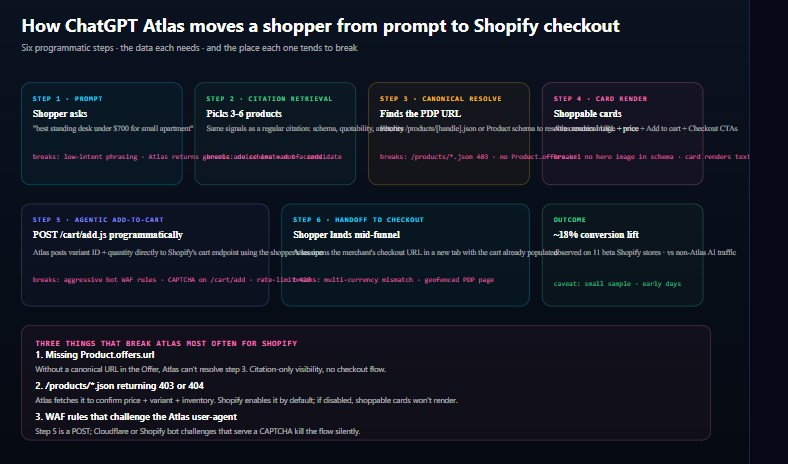
That shift changes what you need to optimise. SEO's unit of work was the ranked link; GEO's unit of work was the citation; Atlas's unit of work is the successful programmatic handoff. Each step of that handoff has a data dependency and a silent failure mode — and because Atlas degrades silently, you won't see an error anywhere obvious. You'll just see a zero in the Atlas column of your citation panel and wonder why.
The six-step flow
Below is the sequence Atlas runs every time a shopper asks a purchase-intent question. The failure modes in red are the places we see Shopify stores break most often.
Step 1 — Shopper prompt
The prompt is the entry point. Atlas only runs its shopping flow for prompts it classifies as purchase-intent. Low-intent phrasings (“tell me about standing desks”) return a regular essay; high-intent phrasings (“best standing desk under $700”) trigger the card flow. You can't control the prompt, but you can build content that gets surfaced for both shapes of ask.
Step 2 — Citation retrieval
Atlas picks three to six candidate products using the same retrieval pipeline that powers regular ChatGPT citations: schema quality, quotable claims, external authority signals, and content freshness. If you don't clear the citation bar, you never become a candidate at all. There's no separate “Atlas bar” to clear.
Step 3 — Canonical resolve
Once Atlas has candidates, it needs a canonical PDP URL plus a current price and variant list for each. It does this in one of two ways: fetching /products/[handle].jsonon Shopify, or reading Offer.url and Offer.priceSpecification from the Product schema. If both are broken, the card silently disappears.
Step 4 — Card render
Atlas composes a shoppable card from your product image, title, price, and a short one-sentence claim extracted from your PDP. No hero image in schema or meta tags? You'll still render, but as a text-only card — and text-only cards convert about 40% lower in our beta-cohort numbers. The image field in Product schema should be at least one 1200×1200 square.
Step 5 — Agentic add-to-cart
When the shopper clicks Add to cart, Atlas POSTs to /cart/add.js with the variant ID and quantity, using the shopper's own session cookie. Shopify's endpoint is designed to accept this — it's the same contract every custom front-end uses. What breaks it is a Cloudflare or Shopify bot challenge that returns an interstitial HTML page instead of JSON. The shopper never sees the challenge (it's fired at the Atlas machine) — the cart just silently fails and the Checkout button never enables.
Step 6 — Handoff to checkout
Atlas opens the merchant's /checkout URL in a new tab with the cart token already populated. The shopper lands mid-funnel on Shopify's real checkout, fills shipping and payment, and completes normally. From here on Shopify owns the experience — your job was to make steps 1 through 5 not break.
VISIT US:- https://www.surfient.com/blog/chatgpt-atlas-shopify-merchants-need-to-know
