ChatGPT Atlas for Shopify: what merchants need
Author : Surfient Surfient | Published On : 04 Jun 2026
ChatGPT Atlas isn't another traffic source — it's an agent. When a shopper asks “best standing desk under $700 for a small apartment,” Atlas doesn't link them out. It renders shoppable cards, posts to your /cart/add.js endpoint on their behalf, and hands them off into a populated Shopify checkout. If your schema, your endpoints, or your WAF rules aren't configured for that round-trip, you're invisible in agentic shopping — no matter how well you rank in standard citations.
What Atlas actually is
Atlas is OpenAI's shopping surface inside ChatGPT. From the shopper's perspective it looks like ChatGPT answered their question with product cards that have Add to cart and Checkout buttons. From the merchant's perspective it's a programmatic consumer of your site — it reads your schema, fetches your product JSON, posts to your cart endpoint, and redirects the shopper to your checkout URL. Everything that used to happen inside the shopper's browser with human hands is now happening over HTTP with machine hands.
That shift changes what you need to optimise. SEO's unit of work was the ranked link; GEO's unit of work was the citation; Atlas's unit of work is the successful programmatic handoff. Each step of that handoff has a data dependency and a silent failure mode — and because Atlas degrades silently, you won't see an error anywhere obvious. You'll just see a zero in the Atlas column of your citation panel and wonder why.
The six-step flow
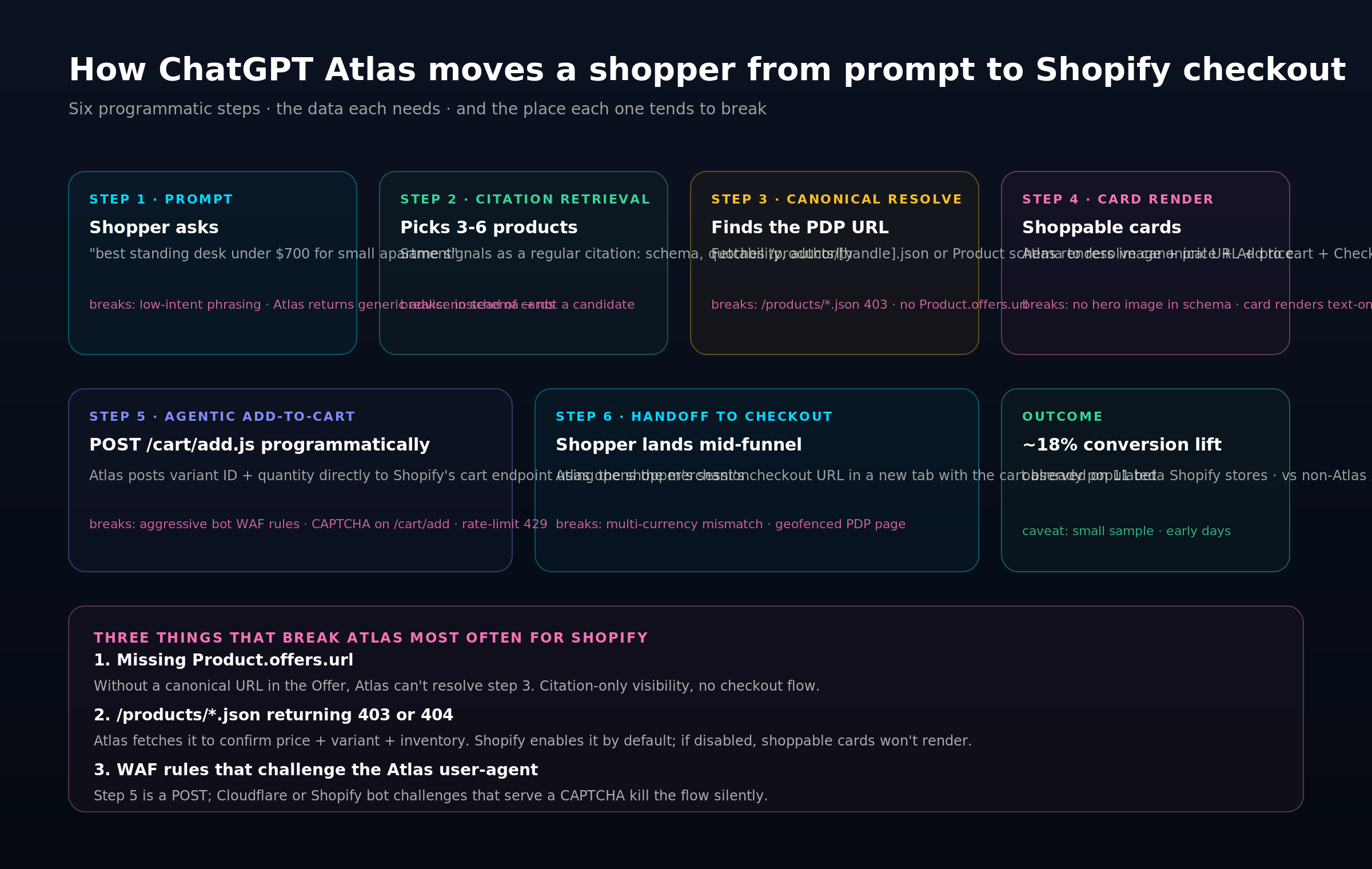
Below is the sequence Atlas runs every time a shopper asks a purchase-intent question. The failure modes in red are the places we see Shopify stores break most often.
Figure 1 — Atlas turns a prompt into a Shopify checkout in six steps. Each step has a data dependency and a silent failure mode.
Step 1 — Shopper prompt
The prompt is the entry point. Atlas only runs its shopping flow for prompts it classifies as purchase-intent. Low-intent phrasings (“tell me about standing desks”) return a regular essay; high-intent phrasings (“best standing desk under $700”) trigger the card flow. You can't control the prompt, but you can build content that gets surfaced for both shapes of ask.
Step 2 — Citation retrieval
Atlas picks three to six candidate products using the same retrieval pipeline that powers regular ChatGPT citations: schema quality, quotable claims, external authority signals, and content freshness. If you don't clear the citation bar, you never become a candidate at all. There's no separate “Atlas bar” to clear.
Step 3 — Canonical resolve
Once Atlas has candidates, it needs a canonical PDP URL plus a current price and variant list for each. It does this in one of two ways: fetching /products/[handle].jsonon Shopify, or reading Offer.url and Offer.priceSpecification from the Product schema. If both are broken, the card silently disappears.
The silent killer at step 3
/products/*.json returns 403 because a theme edit or a WAF rule blocks it, and the Product schema has Offer without Offer.url. Atlas can't fall back to the other source because neither works. Fix order: re-enable the JSON endpoint first, then audit schema, because fixing schema without the endpoint leaves price drift unresolved.Step 4 — Card render
Atlas composes a shoppable card from your product image, title, price, and a short one-sentence claim extracted from your PDP. No hero image in schema or meta tags? You'll still render, but as a text-only card — and text-only cards convert about 40% lower in our beta-cohort numbers. The image field in Product schema should be at least one 1200×1200 square.
Step 5 — Agentic add-to-cart
When the shopper clicks Add to cart, Atlas POSTs to /cart/add.js with the variant ID and quantity, using the shopper's own session cookie. Shopify's endpoint is designed to accept this — it's the same contract every custom front-end uses. What breaks it is a Cloudflare or Shopify bot challenge that returns an interstitial HTML page instead of JSON. The shopper never sees the challenge (it's fired at the Atlas machine) — the cart just silently fails and the Checkout button never enables.
Step 6 — Handoff to checkout
Atlas opens the merchant's /checkout URL in a new tab with the cart token already populated. The shopper lands mid-funnel on Shopify's real checkout, fills shipping and payment, and completes normally. From here on Shopify owns the experience — your job was to make steps 1 through 5 not break.
The 12-point readiness checklist
Below is the same checklist we run on every Atlas-readiness audit, grouped by the part of the flow it protects. Eighty percent of failures cluster in the Schema column — that's where to spend your first week.
Figure 2 — Twelve-point Atlas readiness check, grouped by failure type. Eighty percent of the failures we see cluster in the Schema column.
Schema (the five that matter most)
- Product schema passes Rich Results Test on every PDP template — not just a sample.
- Offer.priceSpecification contains both price and priceCurrency — Atlas rejects cards where currency is implicit.
- Offer.url is the canonical PDP URL, not the collection URL. This is the single most common miss.
- AggregateRating present with reviewCount greater than 20 — the threshold at which Atlas upgrades the card tier.
- FAQPage schema on every collection page with three to five real shopper questions. This feeds step 2 retrieval.
Endpoints
- /products/[handle].json returns 200 OK with no auth and no rate-limit — test from a third-party IP.
- /cart/add.js accepts POST from non-origin user-agents. No CAPTCHA, no 429 rate-limits on normal volumes.
- /checkout URL is reachable from a third-party origin with a populated cart token — test explicitly.
Policies + WAF
- robots.txt explicitly allows OAI-SearchBot, ChatGPT-User, and GPTBot (or allows all). Disallow them and you're dark.
- Cloudflare Bot Fight whitelists the shoppable-web user-agent at the WAF level, not just at the bot score threshold.
Merchant hygiene
- Inventory accurate at the variant level — Atlas cards expose variant availability, and a sold-out variant in a shoppable card is an abandonment guarantee.
- Shipping estimate surface-able from the shipping API per locale. Atlas uses the shopper's approximate locale to display 'ships Mon, arrives Thu' on the card.
The three silent killers
If you only have time to check three things, these are the three we see break most frequently — in priority order.
1. Missing Product.offers.url. Without a canonical URL in the Offer, Atlas can't resolve step 3. You'll still appear in plain citations, but you'll never appear in shoppable cards. It's usually a theme that emits Offer with price but omits url — a five-minute fix.
2. /products/*.json returning 403 or 404. Shopify enables this by default; if yours returns non-200, it's almost certainly a theme or WAF rule. Atlas fetches it to confirm price and variant inventory at card-render time. Without it, the card degrades to text-only or doesn't render.
3. A Cloudflare or Shopify bot challenge on /cart/add. This is the nastiest one because it looks fine to you — your own browser fires past the challenge via the session cookie. But Atlas arriving as a cross-origin POST with a non-standard UA eats the interstitial, returns HTML instead of JSON, and silently kills step 5. Check your WAF rules explicitly for any rule scoped to /cart/*.What to do this week
If you're running a Shopify store and you haven't actively checked for Atlas readiness yet, here's the order of operations that earns the fastest return.
- Run the 12-point checklist against your top-10 SKUs — the Pareto 80% of your revenue.
- Fix every red in the Schema column first — that's where 80% of failures live.
- Test /products/[handle].json from a third-party IP (e.g. a Cloudflare Worker); if it returns non-200, re-enable the JSON endpoint in your theme.
- Audit your WAF rules for anything scoped to /cart/* and whitelist OAI-SearchBot and ChatGPT-User explicitly.
- Run a clean Atlas test from a private window; repeat weekly until all six steps complete without stall.
VISIT US:- https://www.surfient.com/blog/chatgpt-atlas-shopify-merchants-need-to-know
